

The standard blog post format is a headline, a two-to-four-sentence introduction that answers the reader's question, a body split into H2 sections with short paragraphs, lists and visuals, and a conclusion with one next step. Around it sit the parts readers barely notice but search engines read: the URL, the meta description, the byline and date, internal links and image alt text.
This page shows the anatomy of a post part by part, the formatting rules that hold up against real reading data, and six templates (how-to, listicle, explainer, comparison, case study and roundup) you can paste into your editor.
Key takeaways
- Every blog post has the same skeleton. Headline, answer-first introduction, H2 sections, lists and visuals, conclusion with one next step.
- Format for skimmers. Nielsen Norman Group found readers read at most 28% of the words on a typical page, and 74% of viewing time goes to the first two screenfuls.
- Match the format to the search. "How to" queries want numbered steps, "best" queries want a list, "X vs Y" queries want a comparison table.
- Lists help with AI answers too. Surfer found 78% of Google AI Overviews contain a list.
- Explainers and how-tos dominate. They made up 81% of the 200,871 articles Outrank wrote in the 90 days to October 2026.
What is a blog post format?
A blog post format is the standard structure of a blog post: the order of its parts (headline, introduction, body sections, conclusion) and the formatting inside them (headings, paragraph length, lists, images and links). A good format lets a reader find the answer in seconds and lets a search engine understand what each section is about.
Format is not the same as post type. A how-to and a listicle share the same skeleton but fill the body differently, which is why this guide gives you both the anatomy and six templates.
The anatomy of a blog post (9 parts)
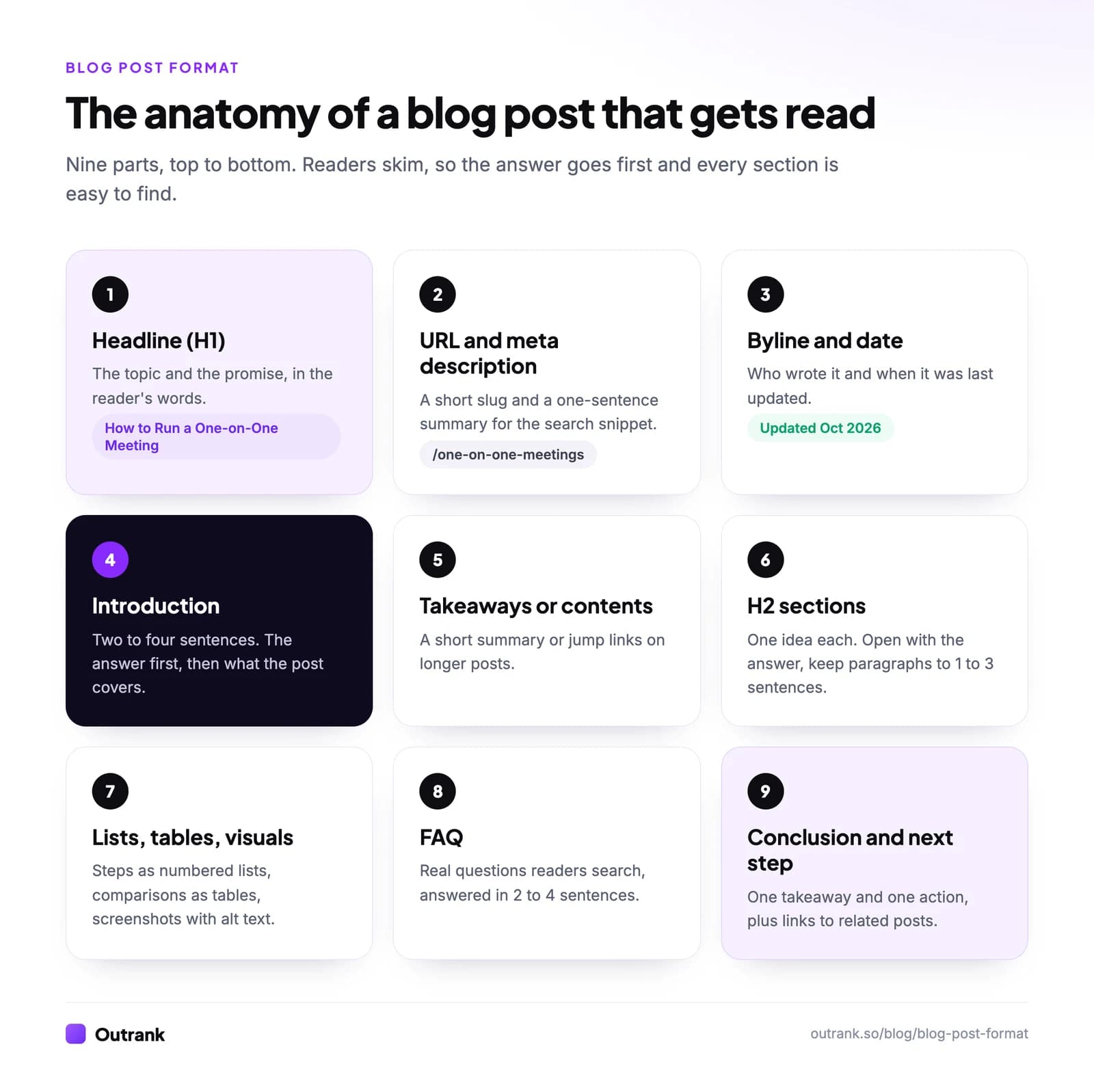
- Headline (H1). The topic and the promise, in the reader's words: "How to Run a One-on-One Meeting (With an Agenda Template)". Use one H1, the title, and make it specific. Our guide to writing meta titles covers the search version.
- URL and meta description. A short, readable slug (/one-on-one-meetings) and a one-sentence summary. Google may use your meta description as the search snippet, so write it for a human deciding whether to click.
- Byline and date. Who wrote it and when it was last updated. Dates matter most on topics that change (prices, tools, rules).
- Introduction. Two to four sentences. Answer the question first, then say what else the post covers. Skip "In this article, we will…".
- Takeaways or table of contents. On posts over about 1,500 words, a short summary box or jump links helps readers go straight to their part.
- H2 sections. One idea per section, with a heading that sounds like a question the reader would ask. Start each section with its answer, then the detail. Keep paragraphs to one to three sentences, and add H3s when a section has distinct sub-points.
- Lists, tables and visuals. Numbered lists for steps, bullets for parallel items, tables for anything compared on three or more attributes, and screenshots or diagrams where words are slower. Every image gets descriptive alt text.
- FAQ. Three to six questions people actually search, each answered in two to four standalone sentences. This is the part AI assistants and featured snippets quote most easily.
- Conclusion and next step. One takeaway and one action, not a recap of everything. Then link to two or three related posts.
Internal links run through all of it: link to your related posts where they genuinely help, with anchor text that says what the reader will find.
Formatting rules backed by data
Most formatting advice is opinion. These rules are grounded in how people actually read.
Put the answer in the first screen. Nielsen Norman Group's eye-tracking research found 57% of page-viewing time is spent above the fold and 74% in the first two screenfuls. A long warm-up spends your best real estate on nothing.
Write for skimmers. On an average web page, people read at most 28% of the words, and 20% is more likely, according to NN/g's reading study. Descriptive subheadings, bold key phrases (sparingly) and short paragraphs let skimmers find what they came for.
Use lists where the content is a list. Surfer's analysis found that 78% of Google AI Overviews contain an ordered or unordered list. Steps, criteria and options formatted as lists are easier for both people and machines to lift.
Let the topic set the length. Google says it has no preferred word count. For context, the average blog post is 1,312 words according to Orbit Media's 2026 survey of 1,042 bloggers. A quick answer can be 600 words; a complete guide can be 3,000.
Give every visual a job. A screenshot of the exact menu, a diagram of a process, a chart of real data. Decorative stock photos add load time and nothing else.
Which blog post format fits your topic?
Look at the words people search. The query usually tells you the format. AI assistants follow the same pattern: in our benchmark of what ChatGPT, Perplexity, Gemini and Claude cite, 73% of the sources cited for "best X" questions were listicles and 75% of those for "X vs Y" questions were comparison articles.
| If the search looks like… | Use this format | Body structure |
|---|---|---|
| "how to …", "… step by step" | How-to | Numbered steps, each starting with a verb |
| "best …", "top …", "… ideas" | Listicle | Numbered items with the same mini-structure |
| "what is …", "… meaning" | Explainer | One-sentence definition, then how it works, examples, why it matters |
| "X vs Y", "X or Y", "X alternative" | Comparison | Side-by-side table, then a verdict by use case |
| "[product] results", "[method] case study" | Case study | Before, what changed, after, with numbers |
| "… tools", "… examples" | Roundup | Criteria first, then each entry with what it's best for |
Here is what that mix looks like at scale. Across the 200,871 articles Outrank wrote for 4,348 sites in 90 days, explainers and how-tos made up more than 80%, because most searches are questions.
Blog post formats in 200,871 Outrank articles
Explainer guides
54%
How-to guides
27%
Roundup listicles
7.4%
Comparisons
4.4%
Resource lists
2.9%
Examples listicles
1.8%
Reference guides
1.6%
One caveat from our own research: the most common format is not always the one that gets clicked. In Outrank's study of 6.2 million pages, "what is" definitions at positions 4 to 10 earned 0.52 times the click-through rate of the same sites' other articles, and "best X" listicles 0.69 times, while free tools and calculators earned 2.11 times. Short definitions are exactly what AI answers now give away, so an explainer needs depth, examples or a tool to earn the visit.
6 blog post templates to copy
Paste a template into your editor, replace the brackets, and delete any part you don't need. Each one follows the anatomy above.
Template 1: How-to post
# How to [Achieve Result] ([Qualifier: in X Steps / for Beginners / Without Y])

[One or two sentences that answer the question: the method in brief.]
[One sentence on what this post covers and who it's for.]

## What you need before you start
- [Tool, access or skill]
- [Time it takes]

## Step 1: [Verb + action]
[What to do, exactly. Screenshot or example.]

## Step 2: [Verb + action]
[...]

## Step 3: [Verb + action]
[...]

## Common mistakes
- [Mistake and how to avoid it]

## FAQ
### [Real question people search]
[Two to four sentences.]

[One next step, plus links to two related posts.]Template 2: Listicle
# [Number] [Best/Proven] [Things] for [Audience or Goal] ([Year])

[Two sentences: the top pick or the main takeaway, then how the list was chosen.]

## Quick comparison
| Item | Best for | Key detail |
| --- | --- | --- |

## 1. [Item name]: best for [use case]
[Why it's on the list, one specific example, one drawback.]

## 2. [Item name]: best for [use case]
[Same mini-structure for every item.]

## How we chose
[Your criteria in three to five bullets.]

## FAQTemplate 3: Explainer ("What is…")
# What Is [Term]? [Plain-English Promise, e.g. "Definition, Examples and How It Works"]

[Term] is [one-sentence definition a stranger would understand].
[One sentence on why it matters to the reader.]

## How [term] works
[The mechanism, in steps or a simple diagram.]

## [Term] examples
[Two or three concrete, real examples.]

## [Term] vs [the thing people confuse it with]
[A short table or two paragraphs.]

## How to [use / measure / start with] [term]
[Practical steps.]

## FAQTemplate 4: Comparison (X vs Y)
# [X] vs [Y]: [Which Is Better for Reader's Goal] ([Year])

[Verdict in two sentences: choose X if..., choose Y if...]

## [X] vs [Y] at a glance
| | [X] | [Y] |
| --- | --- | --- |
| Price | | |
| Best for | | |
| Main limitation | | |

## Where [X] wins
## Where [Y] wins
## Which should you choose?
[Recommendation by use case: "If you..., pick..."]

## FAQTemplate 5: Case study
# How [Customer] [Achieved Specific Result] in [Timeframe]

[The result in one sentence, with the number. Who they are in one more.]

## The starting point
[Situation and the problem, with baseline numbers.]

## What they changed
[The actions, in order, with dates.]

## The results
[Numbers before and after, a chart, and what didn't work.]

## What you can copy
[Three takeaways another reader can apply.]Template 6: Roundup (tools or examples)
# [Number] [Tools/Examples] for [Task] ([Year])

[Two sentences: the best overall pick and how the list was built.]

## How we picked
[Criteria, and when you checked prices or availability.]

## [Tool or example 1]
- Best for: [use case]
- Price: [as of month year, from the vendor's page]
- Why it's here: [one specific reason]
- Watch out for: [one limitation]

## [Tool or example 2]
[Same structure.]

## Comparison table
## FAQ
Want to see the templates filled in? Our blog examples for students break down 14 real blog posts by type, and our long-form content examples show how guides, research and case studies are structured at length.
Blog post format examples worth studying
Each of these real posts follows one of the templates above:
- How-to: James Clear's Habit Stacking gives one named method, a fill-in formula, then a long list of examples.
- Ultimate guide: Backlinko's Link Building for SEO answers "what is link building" first, then works through numbered steps under clear H2s.
- Original research: Ahrefs' 96.55% of Content Gets No Traffic From Google puts the finding in the headline.
- Itinerary (a how-to variant): Earth Trekkers' Two Weeks in Spain (By Train) opens with a day list and a map, then one H2 per day. More in our roundup of travel blog examples.
- Comparison: The Broke Backpacker's I've Been to Bali and Lombok - Here's How I'd Choose states first-hand experience in the title.
- Case study: Our own Life Purpose App case study leads with the result (513 to 2,309 monthly Google clicks in a year), then the timeline and charts.
If formatting is what slows you down, plan the structure before you write with a blog post outline, then follow our step-by-step guide on how to write a good article. Outrank applies this format automatically to every article it writes: an SEO title and meta description, H2 and H3 structure, internal and external links, images with alt text, and an FAQ.
FAQ
What is the format of a blog post?
A blog post has a headline, an introduction that answers the reader's question in two to four sentences, a body organized under H2 subheadings with short paragraphs, lists and visuals, and a conclusion with one next step. Around it sit the URL, meta description, byline, date, internal links and image alt text.
What are the main parts of a blog post?
The main parts of a blog post are the headline, the introduction, the body sections under subheadings, supporting elements (lists, tables, images, examples) and the conclusion or call to action. Longer posts often add a takeaways box or table of contents near the top and an FAQ near the end.
How long should a blog post be?
As long as the topic needs. Google says it has no preferred word count, and the average blog post is 1,312 words according to Orbit Media's 2026 survey. Quick answers can run 600 to 1,000 words; complete how-to guides and pillar pages often need 2,000 to 3,000 or more.
How many headings should a blog post have?
Use one H2 for each main question or idea the post covers, which usually means four to eight H2s in a 1,500 to 2,500-word post. Add H3s only when a section has distinct sub-points, such as individual steps or items in a list.
What is the best blog post format for SEO?
The best format for SEO matches the search intent: numbered steps for "how to" searches, a list for "best" searches, a comparison table for "X vs Y". Put a direct answer near the top, use descriptive headings, keep paragraphs short, add alt text to images and link to related posts.
Does a blog post need a conclusion?
It needs an ending, not a summary. One or two sentences with the key takeaway and a clear next step (try this, read that, download this) work better than a paragraph that repeats the post.