SEO for fashion brands means getting your category and product pages found when shoppers search by attribute (color, fabric, cut, occasion, size), and getting your catalogue into Google's free shopping surfaces through Merchant Center. Most of the work that is specific to fashion is catalogue hygiene: deciding which filter pages deserve to be indexed, grouping colors and sizes so Google sees one product, and handling the styles that sell out every season.
This guide covers those fashion-specific decisions first, then the content and links that grow a clothing store's traffic. If you run a store on Shopify and would rather hire help, our list of Shopify SEO experts covers that route.
Key takeaways
- Fashion shoppers search by attributes: color, fabric, cut and occasion ("linen wide-leg trousers"). Build collection pages for the combinations people actually type, not for every filter.
- Google's own ecommerce guidance asks for category descriptions that cover broad queries and product descriptions that use shoppers' words. Write both yourself, not from the supplier's copy.
- Filter URLs (size, color, price, sort) can create a near-infinite number of pages. Google recommends blocking the ones you don't need indexed.
- Every sold-out style needs a decision: keep it live, redirect it to its replacement, keep it as an archive page, or let it 404.
- In Outrank's study of 1,383 sites, 82% of the 45 fashion and beauty sites grew their Google clicks, from a median 508 to 1,154 clicks per 28 days.
How fashion shoppers search
A fashion search is usually a list of attributes. Someone who types "black linen wide leg trousers women" has already chosen the color, fabric, cut and department; the store that ranks is the one with a page that matches all four. Broad terms like "dresses" are dominated by marketplaces and department stores, so a brand's realistic wins sit one or two attributes deeper.
Map each search pattern to the page that should answer it:
| Search pattern | Example | Page that should rank |
|---|---|---|
| Product type + attributes | "linen midi dress with pockets" | Collection page for that attribute set |
| Occasion | "wedding guest dresses for fall" | Occasion collection, plus a styling guide |
| Fit question | "do [brand] jeans run small" | Product page fit notes, size guide, FAQ |
| Fabric question | "merino vs cashmere sweater" | Fabric guide linking to both collections |
| How to wear | "how to style a trench coat" | Styling guide linking to the products |
| Brand + product | "[brand] slip dress review" | Product page with reviews |
| Care | "how to wash a wool coat" | Care guide (and a link from every wool product) |
Before you build anything, check what people already search for on your site. In Search Console, open Performance → Search results, filter pages that contain /collections/ or /products/, and read the Queries tab: you will usually find attribute searches (a fabric, a fit, a color) that land on pages not built for them. For fresh ideas, our guide to ecommerce keyword research walks through Google autocomplete, marketplace search bars and keyword tools.
Collection pages are your money pages
Product pages come and go with each season. Collection (category) pages stay, collect links and rank for the attribute searches above, which makes them the most valuable URLs in a fashion store.
Google's ecommerce documentation recommends category descriptions to cover less specific queries and product descriptions that match the words shoppers use. On a collection page that means a short intro (a few sentences, not an essay pushing the products below the fold) that says what's in the range, how it fits, what it's made of and who it's for.
Three rules for collection pages:
- Create collections on purpose. A collection for "linen dresses" or "petite jeans" is worth building if people search for it and you stock enough products to fill it (a page with two items is a weak result). Use Search Console queries and keyword tools to decide.
- Link to every product from its category. Google's guide to ecommerce site structure warns that Googlebot generally doesn't use your search box, so products that are only reachable through search may never be found. Link bestsellers from the homepage too: Google reads the number of internal links as a sign of importance.
- Don't let collections compete. "Women's linen trousers" and "linen pants for women" are the same search. Pick one URL and merge the other into it, or both pages will split the rankings (see keyword cannibalization).
Filters, colors and sizes: keep Google out of the maze
Filtering by size, color, price and sort order is essential for shoppers and a crawling problem for Google. Every combination can produce a new URL. In its faceted navigation guidance, Google says these URLs "can generate infinite URL spaces", which leads to overcrawling and slower discovery of the pages you actually care about, like new arrivals.
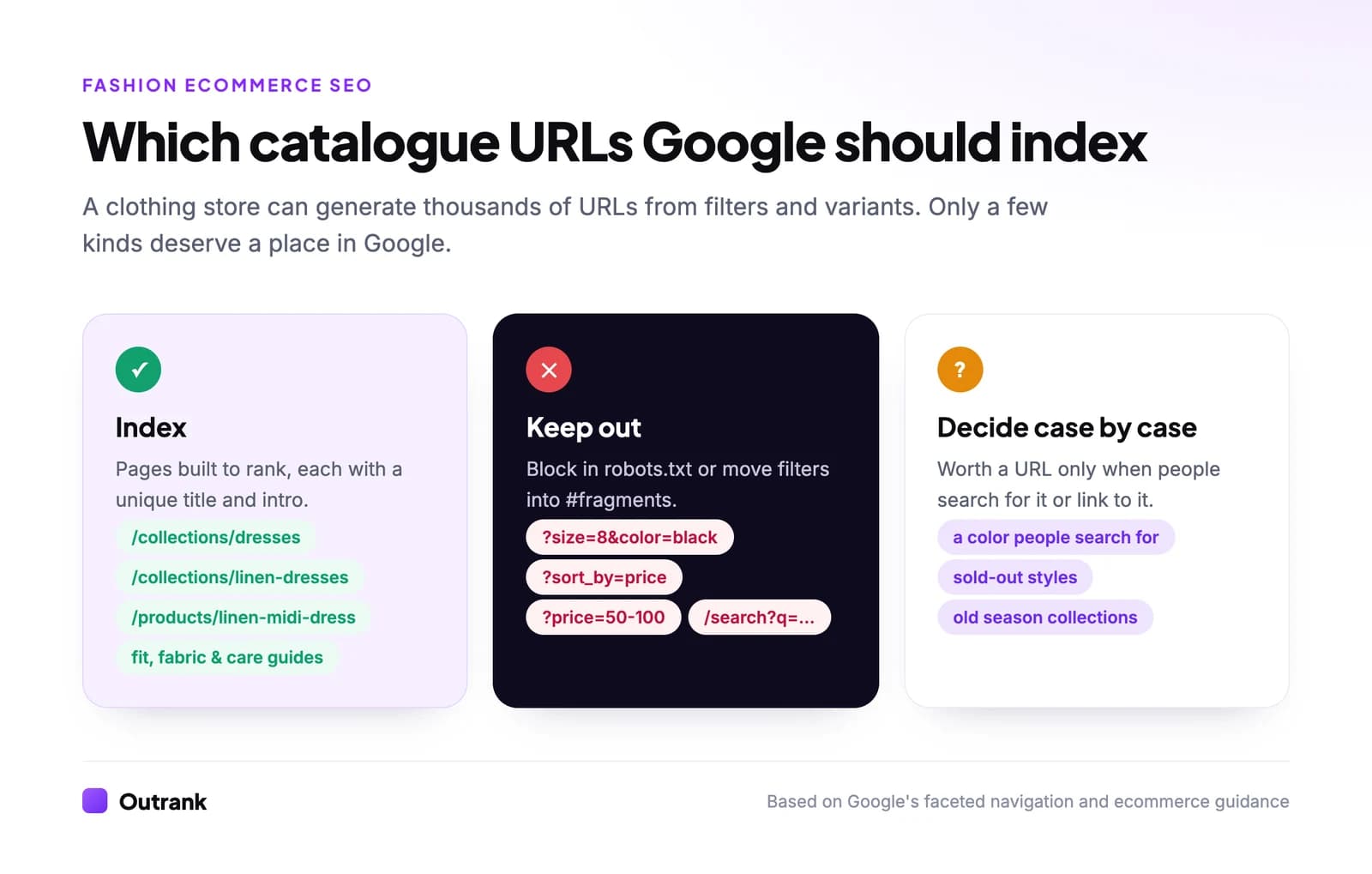
Google's recommended options, in order:
- Block filter parameters you don't need indexed in robots.txt (for example
disallow: /*?*size=anddisallow: /*?*sort_by=), and keep one unfiltered listing page crawlable. Internal search result pages (/search?q=) belong on the same list. - Or put filters in URL fragments (
/collections/dresses#size=8), which Google ignores for crawling and indexing. - Canonical tags and nofollow on filter links work too, but Google calls them "generally less effective in the long term".
The exception is a filter combination people search for. "Linen dresses" deserves to be a real collection with its own clean URL, title and intro, not a parameter URL you hope Google indexes.
One product, many variants
A dress in five colors and six sizes is one product to a shopper. Tell Google the same thing:
- Use ProductGroup structured data with
variesBy(Google supports color, size, material, pattern, suggestedAge and suggestedGender), aproductGroupID(the parent SKU) andhasVariantfor each variant. Each variant's name should be more specific than the group's, for example "Wool winter coat, green, size small". - Don't rely on
#fragmentsfor variants. Google treats/product/t-shirt#blackand/product/t-shirt#whiteas the same page (ecommerce URL guidance). If a color needs to rank on its own, give it a query parameter or path Google can crawl. - Give a color its own indexable page only when people search for that color of that product ("green wool coat"). Otherwise, one product URL with a color selector is cleaner.
On Shopify, most themes already output Product markup, but variant grouping depends on the theme or an app, so test a product URL in the Rich Results Test before assuming it's there.
When a style sells out
Fashion catalogues churn every season, which leaves hundreds of URLs for products you no longer sell. Some of those pages have links from press features or still get searched by name. Deciding page by page is tedious, so use the same four outcomes every time. Answer three questions for a sold-out product:
3-question decision helper
What should happen to this sold-out product page?
Question 1 of 3
Will this exact product come back?
Whatever you pick, keep the structured data honest. Google's merchant listing documentation supports availability values including InStock, OutOfStock, BackOrder, PreOrder, SoldOut and Discontinued.
Product pages: write what the photo can't say
A product photo shows the color and the cut. It can't show the fabric weight, how the size runs or whether it's see-through, and those are exactly the questions shoppers type into Google and ask AI assistants. Answering them on the page helps the search ranking and cuts returns.
Every product page should carry:
- Fabric composition and weight, in plain words ("100% linen, midweight, slightly sheer in white").
- Fit notes: how it runs, the model's height and the size they wear, the garment's key measurements.
- A size guide linked from the page, with measurements in both inches and centimeters if you ship abroad.
- Care instructions, and where it was made.
- Reviews that mention fit. Ask "How does it fit?" in your review request. Those answers are the long-tail content no copywriter can invent.
- Your return policy. Google supports return policy markup at the organization level. If you also set returns in Merchant Center or Search Console, Google uses those settings ahead of the markup on your pages.
For images, Google says descriptive filenames give "very light clues" and that captions, alt text and nearby text matter more (Google Images best practices). Name files like black-linen-wide-leg-trousers-front.jpg, write alt text that describes the garment and how it's worn, and compress everything: fashion pages carry a lot of photos. Our guides on naming images for SEO and optimizing images for the web have the details.
Get your catalogue into Google's free shopping surfaces
Ranking a product page in the blue links is one path. Free listings are the other, and many small fashion brands never switch them on. According to Google Merchant Center Help, eligible products with free listings can appear at no cost on Google Search, Google Maps, Gemini, YouTube, the Shopping tab, Google Images and Google Lens.
How to set it up:
- 1
Create a Merchant Center account
Verify and claim your website. Shopify stores can connect through the Google & YouTube app instead of uploading a feed by hand. - 2
Send a clean product feed
Use specific titles (brand + product type + key attributes, like 'Linen wide-leg trousers, black') and real availability. Apparel needs color, size, gender and age group: Google's product data specification makes them required for apparel sold in the US, UK, Germany, France, Japan and Brazil, and for all apparel in free listings. - 3
Add your return and shipping policies
Set them once in Merchant Center (or Search Console) so Google can show delivery and return details with your products. - 4
Check the Lens and Images basics
Google's ecommerce guide says products need to be in Merchant Center, opted in to product listings and following image best practices to show up in Google Lens results. - 5
Keep the feed and the site in sync
Price or availability mismatches between your feed and your product pages can get products disapproved. Fix them before you add more products.
Google's ecommerce documentation recommends doing both: product structured data on your pages and a feed in Merchant Center.
Content that earns fashion traffic
Product and collection pages capture shoppers who know what they want. Content captures the much larger group who are still deciding, and it gives other sites and AI assistants something to cite. The formats that fit fashion:
- Fit guides: one page per product type ("how our jeans fit") with every fit compared on rise, leg and stretch.
- Fabric and material guides. Allbirds' sustainability page opens with the wool, tree fibre and sugarcane its shoes are made from. A "linen vs cotton for summer" guide does the same job for a clothing brand.
- Occasion and styling guides ("what to wear to a fall wedding") that link straight to the products.
- Care guides for each fabric you sell, linked from every product made of it.
- Brand and sourcing pages. Everlane's about page leads with "Ethical factories. Radical Transparency." Pages like that answer the "is [brand] ethical" and "where is [brand] made" searches that otherwise go to third-party blogs.
Consistency matters more than volume. Lavender Lobster, a slow-fashion womenswear brand on Shopify, publishes keyword-targeted posts daily through Outrank; according to its Outrank success story, its content now appears in 44 Google AI Overviews and 36 AI Mode answers. Outrank's Shopify integration researches the keywords, writes the posts with images and alt text and publishes them to your blog. A styling guide still needs your own photos and point of view to stand out.
Links for fashion brands
Fashion has more natural link sources than most industries:
- Stockists and wholesale partners linking to your brand page.
- Press and gift guides. Editors build "best linen trousers" roundups every season; make their job easy with a press page, high-resolution images and prices.
- Collaborations with designers, artists or other brands, each with a launch page both sides link to.
- Original data, like a size survey or a "fabric durability" test you actually ran.
Our guide to ecommerce link building covers outreach in detail. If you'd rather build links on autopilot, Outrank's backlink exchange places links inside relevant articles on other sites in the network.
What results to expect
SEO for a fashion store compounds slowly. In Outrank's study of Search Console data from 2,119 sites, the median site was 7% above its starting clicks after the first 28 days and about 2× after seven months. Fashion and beauty sites did slightly better than average:
Share of sites that grew Google clicks after starting with Outrank
Fashion & beauty
45 sites · 508 → 1,154
82%
Shopify stores (all niches)
153 stores · 895 → 1,993
82%
E-commerce & retail
55 sites · 875 → 2,202
71%
All sites in the study
297 → 814
75%
One caveat: clicks per impression are falling across Google. In Outrank's zero-click study, the median fashion and beauty site (14 sites) kept only 0.75× of its click-through rate between October 2025 and August 2026, as AI Overviews answered more queries on the results page. You need more visibility for the same traffic, which is one more reason to cover the long tail of attribute and fit searches.
FAQ
What is SEO for fashion brands?
SEO for fashion brands is the work of getting a clothing or accessories store's collection and product pages to rank in Google for the searches shoppers make, which are usually combinations of product type, color, fabric, fit and occasion. It also covers technical catalogue issues (filters, variants, sold-out styles) and getting products into Google's free shopping listings through Merchant Center.
How do I do SEO for a clothing store on Shopify?
Start with collection pages: give each a unique title, a short intro and a clean URL, and build new collections only for attribute combinations people search for. Then check that your theme outputs Product structured data, connect the Google & YouTube app for free listings, and publish fit, fabric and styling guides that link to your products.
Should each color of a product have its own URL?
Usually not. One product URL with a color selector, grouped with ProductGroup structured data, is cleaner. Give a color its own indexable URL only when people search for that specific color of that product, and never rely on #fragment URLs for variants, because Google treats them as the same page.
What should I do with out-of-stock product pages?
Keep the page live and mark it out of stock if it will be restocked soon. If it's gone for good, 301 redirect it to a near-identical replacement, keep it as an archive page with alternatives if it still has links or searches, or let it return a 404 or 410 if it has neither.
How long does SEO take for a fashion ecommerce site?
Expect three slow months before growth becomes visible. In Outrank's study of 2,119 sites, the median site was up 27% after 84 days and about 2× after seven months, with fashion and beauty sites growing slightly more often than the average.