Outrank
Outrank writes its own blog posts. Yes, you heard that right!
Table of Contents
- What Keyword Search Volume Actually Means (And Why It's Not What You Think)
- Why Free Tools Give You Different Numbers
- Google Keyword Planner: How to Check Search Volume for Free
- How to Use Google Keyword Planner Step by Step
- When to Use Keyword Planner for SEO Research
- Google Keyword Planner: Common Mistakes to Avoid
- Google Keyword Planner's Biggest Limitation
- Google Trends: Check Keyword Trends and Seasonality for Free
- How to Use Google Trends for Keyword Research
- When Google Trends Is the Right Tool
- Google Trends: The Misunderstanding Most People Have
- Google Trends' Biggest Limitation
- Google Search Console: Find Keywords You Already Rank For
- How to Find Keywords in Google Search Console
- Why Search Console Matters More Than Ever in 2026
- When to Use Google Search Console for Keyword Research
- Google Search Console's Biggest Limitation
- Free Keyword Research Tools: Get Fast Search Volume Estimates
- How to Use Free Keyword Research Tools Effectively
- When Free Keyword Tools Are the Right Choice
- The Mistake Most People Make with Free Keyword Tools
- Free Keyword Tool Limitations to Know
- Browser Extensions: Check Search Volume While You Browse Google
- How to Use a Keyword Research Browser Extension
- When a SERP Extension Makes Sense
- Browser Extension Limitations for Keyword Research
- Bonus: The Google Ads Search Terms Report
- Our Recommended Free Workflow for Checking Keyword Search Volume in 2026
- How to Decide Whether a Keyword Is Actually Worth Targeting
- 1. Does the Search Intent Match the Page You Can Create?
- 2. Does the Keyword Have Click Potential?
- 3. Can Your Site Realistically Compete?
- 4. Is the Topic Stable or Rising?
- 5. Does the Keyword Move the Business?
- Keyword Research Mistakes That Kill Your Rankings
- How Outrank Automates Keyword Research (Skip the Manual Work)
- Want Expert-Level SEO Without the Grind? Meet Outrank Agency
- Frequently Asked Questions
- Can I Check Keyword Search Volume for Free?
- What Is the Most Accurate Free Source for Keyword Search Volume?
- Why Do Different Keyword Tools Show Different Volumes?
- Is Google Trends Enough on Its Own?
- Does Keyword Search Volume Still Matter in 2026?
- What's the Difference Between Search Volume and AI Prompt Volume?
- How Does Outrank Help with Keyword Research?

Do not index
Do not index
Search volume sounds like the simplest thing in SEO. Type in a keyword, get a number, decide if it's worth your time.
Except that's not really how it works.
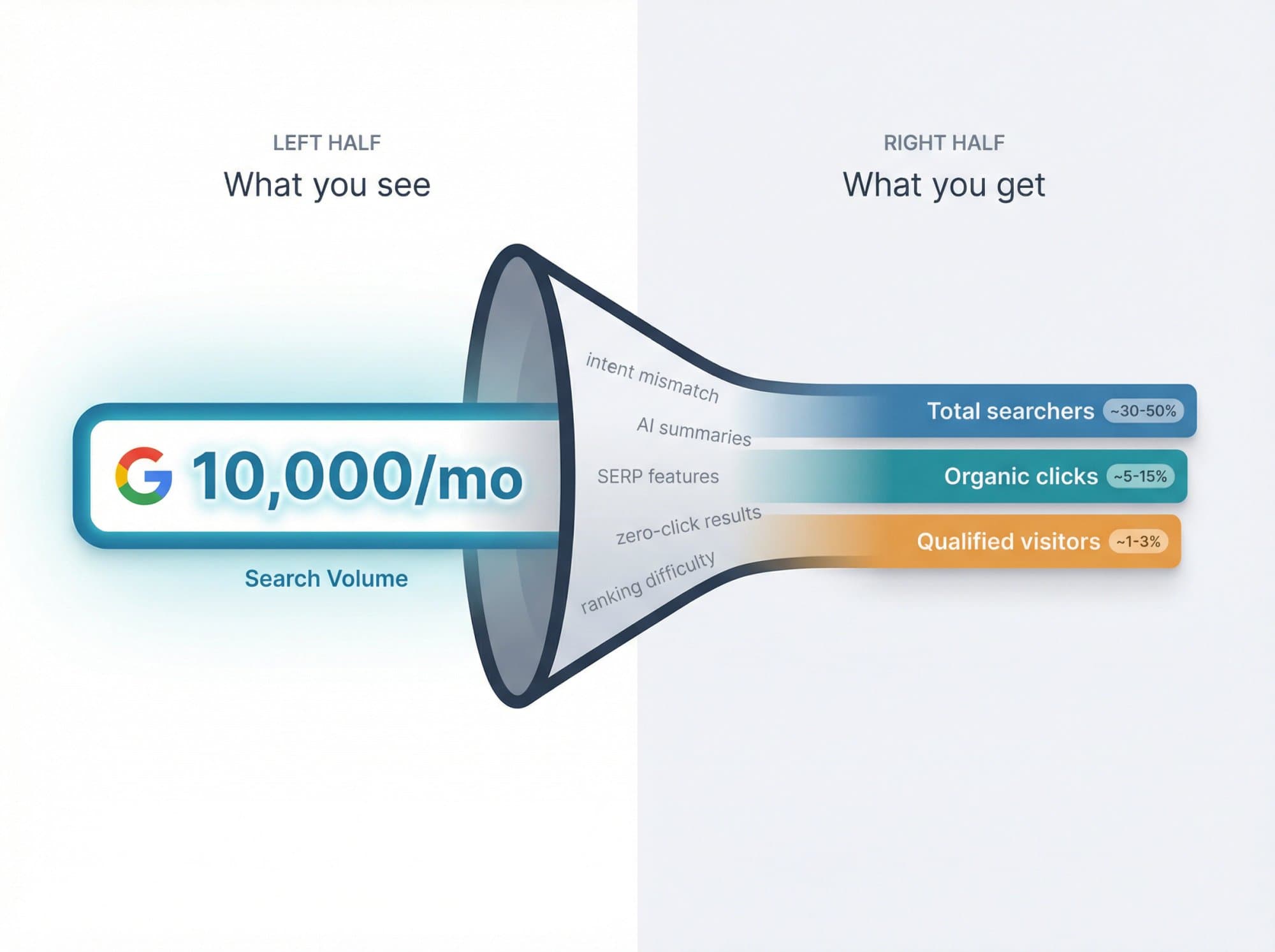
Keyword search volume is an estimate of how many times people search a given term per month in a specific location. It's not a live counter. It's not unique users. And it's definitely not guaranteed traffic. Even Google's own Keyword Planner documentation says search volume stats are rounded and fluctuate because of seasonality, current events, and other factors.
And in 2026, the landscape has shifted. Some platforms now separate traditional search volume from AI prompt volume, and a Pew Research Center analysis published July 22, 2025 found that users clicked traditional search results less often when an AI summary appeared on Google (8% of visits versus 15% when no AI summary appeared). So the question isn't just "what's the volume?" anymore. It's "is this keyword actually worth creating content for?"
If you want the fastest practical answer: use Google Keyword Planner for a baseline, Google Trends for trend direction, and Google Search Console for real impressions on queries your site already touches. Then use a free keyword research tool or a SERP extension for quicker estimates and more keyword ideas.
Most people searching "how to check keyword search volume" are really trying to do one of three things:
- Figure out whether a keyword is worth writing about
- Compare a few keyword ideas before publishing content
- Find low-competition opportunities without paying for a big SEO suite
This guide covers all three. And if you'd rather skip the manual research entirely, Outrank can automate keyword discovery and content creation in one pipeline. But first, you should understand what you're looking at.

What Keyword Search Volume Actually Means (And Why It's Not What You Think)

From first principles, search volume is a proxy for demand.
If lots of people keep typing the same phrase into Google, that phrase represents repeated demand. SEO tools try to estimate that demand, usually as average monthly searches in a specific country. But that number does not tell you:
- How many of those searchers will actually click a result
- Whether they want to buy anything
- How hard the keyword is to rank for (and keyword difficulty is a whole separate metric worth understanding on its own)
- Whether Google will answer the query directly on the results page
- Whether your page type matches the search intent
That's why a keyword with modest volume can be far more valuable than a much bigger keyword. A tight, high-intent query like "best CRM for real estate agents" can drive better business results than a broad term like "CRM software" that gets tens of thousands of searches but weak clicks and brutal competition. Understanding the difference between short-tail and long-tail keywords is fundamental to making smart decisions here.
One more thing to keep straight: traditional keyword search volume and AI prompt volume are not the same metric. Some platforms now show AI volume estimates separately from classic search-engine keyword volume. Don't mix the two up when you're doing your research.
Why Free Tools Give You Different Numbers

This is where most people get confused, and most guides skip over it.
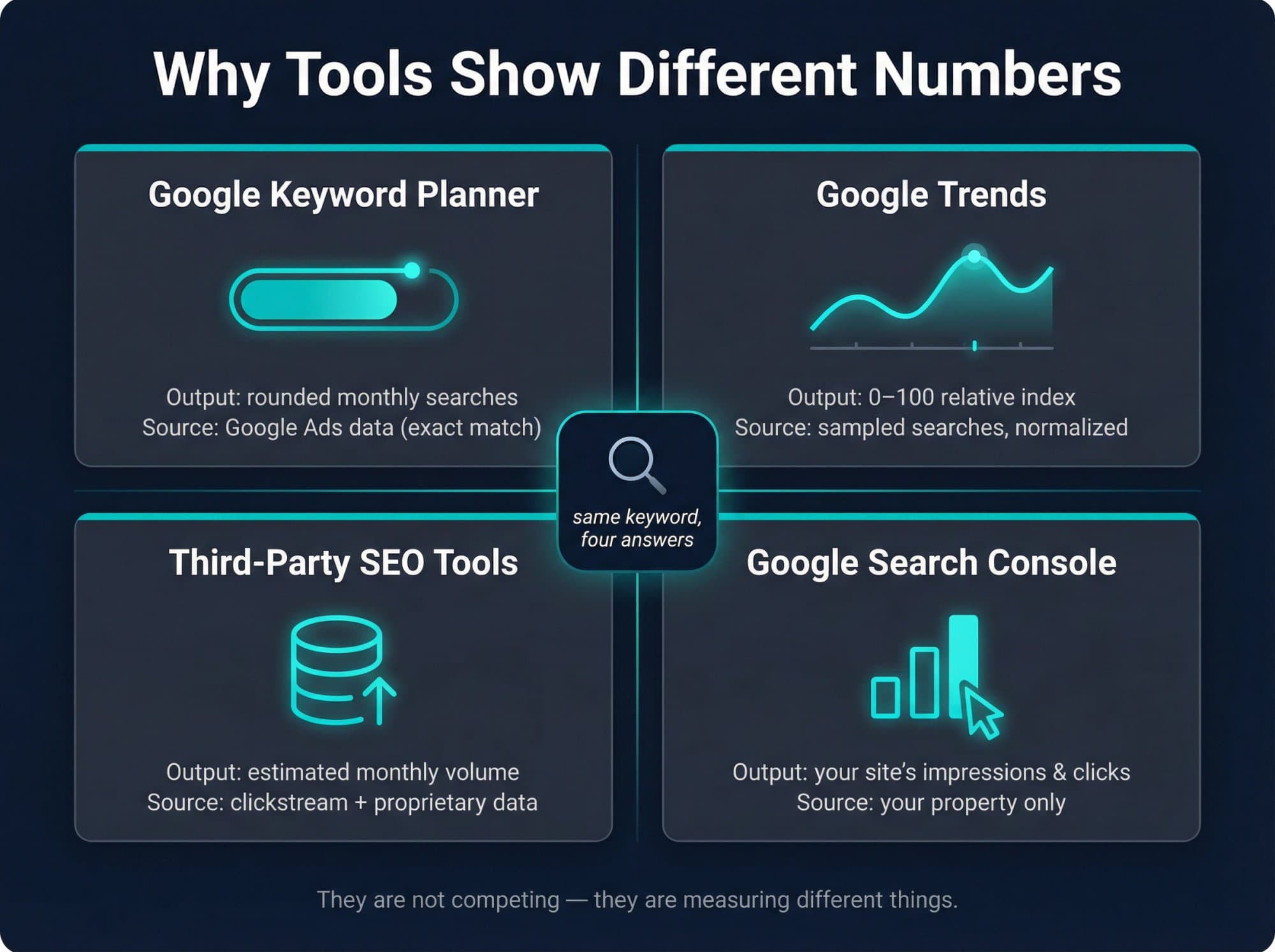
A keyword can show one number in Google Keyword Planner, another in a third-party tool, and a completely different-looking pattern in Google Trends. That doesn't automatically mean one tool is wrong. They're measuring different things.
Tool | What It Measures | Data Source |
Google Keyword Planner | Rounded monthly search volume tied to Google Ads | |
Google Trends | Relative popularity on a 0-100 scale | |
Third-party SEO tools | Estimated monthly search volume | Clickstream data and proprietary databases |
Google Search Console | Impressions and clicks for your property |
Each method below has a specific job. Knowing which one to reach for saves you a lot of time.
Google Keyword Planner: How to Check Search Volume for Free
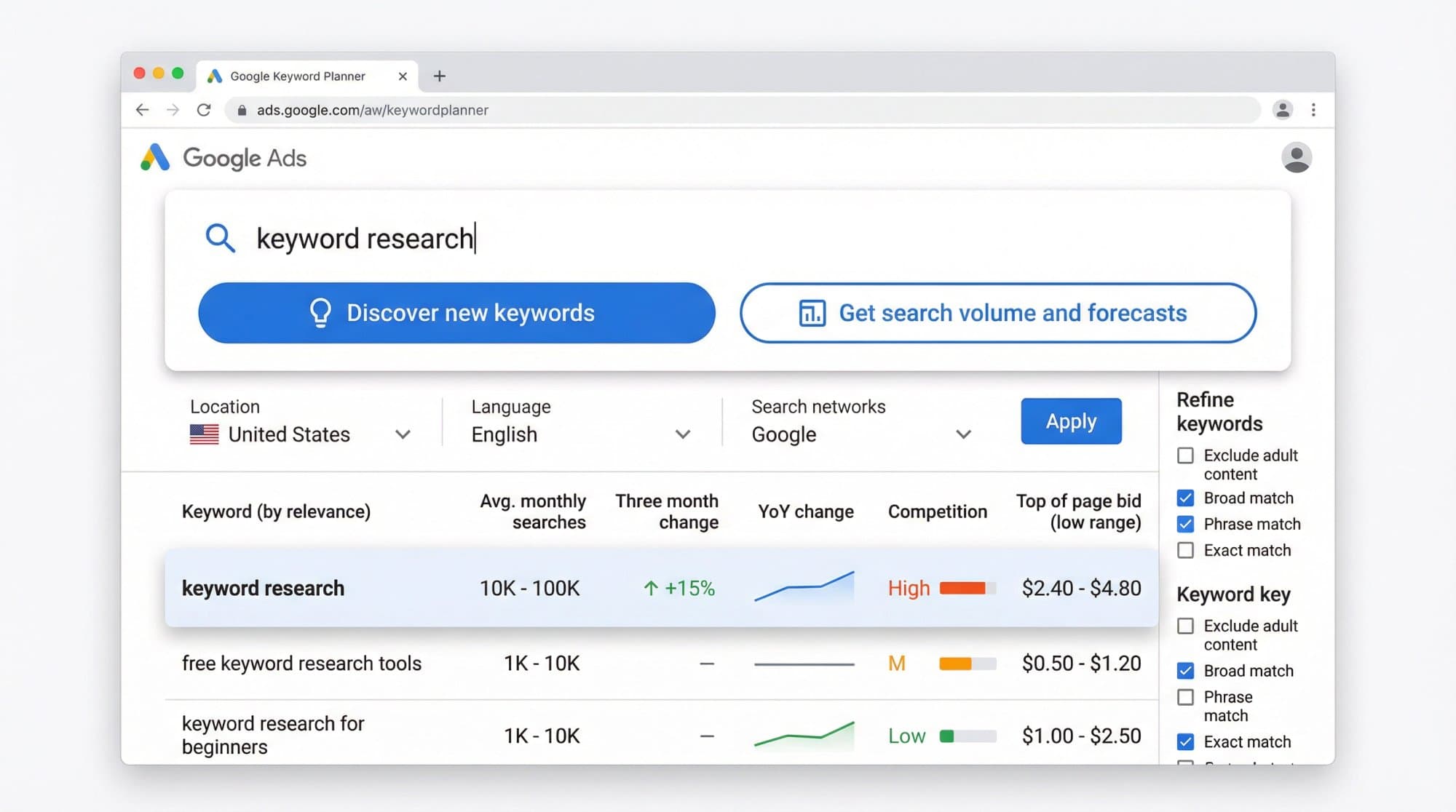
Google Keyword Planner is still the best free starting point for checking keyword search volume because it comes directly from Google Ads. Google says it helps you discover new keywords, see monthly search estimates, and get search volume forecasts. To access the basic features, Google requires you to complete Google Ads account setup and enter billing information. The tool also lets you filter by location, language, date range, and network.
How to Use Google Keyword Planner Step by Step
- Open Google Ads
- Go to Tools then Planning then Keyword Planner
- Choose either Discover new keywords (if you want ideas from a seed term or website) or Get search volume and forecasts (if you already have a list)
- Set your location, language, and network
- Review average monthly searches, trend line, and related keyword ideas

The official Google Ads Keyword Planner is free to access. Start at the marketing page below and sign in with your Google Ads account to reach the tool itself.

When to Use Keyword Planner for SEO Research
Use Keyword Planner when you want a rough, Google-native baseline for demand. It's especially useful when you're comparing keyword buckets (like "email marketing software" vs "email automation tool"), not obsessing over tiny differences between numbers.
It's also great for seeing how demand shifts by geography and time. Google explicitly supports narrowing results by location, language, and date range, which matters because search demand is rarely universal. This geography angle is especially important if you're doing keyword research for ecommerce, where buyer intent varies dramatically by market.
Google Keyword Planner: Common Mistakes to Avoid
First, they treat the number as exact. Google says the data is rounded, and that searches fluctuate over time.
Second, they ignore that Google says search volume statistics are based on exact keyword matches. That means the volume number is narrower than what many SEO tools show when they fold variants and related phrases into the picture.
Third, they confuse ad metrics with SEO metrics. Keyword Planner is built for Search campaigns, forecasting, bids, and impression share. So treat its CPC and competition fields as advertising signals, not as a pure organic SEO difficulty score. For a cleaner view of how to track keyword rankings over time, you'll want a dedicated tracking setup.
Google Keyword Planner's Biggest Limitation
Google notes that very low-volume keywords or sensitive keywords may not be discoverable or forecastable. So if Keyword Planner shows nothing, that doesn't always mean nobody searches for the term. It can mean Google simply doesn't expose the data in that workflow. This is one reason why finding low-competition keywords often requires combining multiple tools rather than relying on a single source.
Google Trends: Check Keyword Trends and Seasonality for Free
Google Trends answers a different question than Keyword Planner: Is interest rising, falling, or seasonal?
That matters more than most people realize. A keyword with lower current monthly volume but strong upward momentum can be more valuable than a flat keyword with a slightly bigger number. And a seasonal keyword (like "best Christmas gifts") needs a completely different content calendar than an evergreen one.
Google says Trends uses a sample of Google searches and normalizes the data to a 0 to 100 scale based on a topic's proportion to all searches in the chosen time and place. It also says low-volume searches can appear as 0, and equal scores across regions do not mean equal absolute volume.
How to Use Google Trends for Keyword Research
- Open Google Trends
- Enter your keyword
- Set the country you care about
- Set the time range (usually 12 months for seasonality, 5 years for long-term direction)
- Compare the term against close alternatives
- Check Interest over time, Interest by region, and Related queries

When Google Trends Is the Right Tool
Google Trends is the fastest way to answer:
- Is this keyword seasonal?
- Is this topic growing or dying?
- Which phrasing is more popular over time?
- Which regions care most about this topic?
It's especially useful for comparing terms that look similar but aren't equally popular. One phrase might dominate in the U.S. while a different wording wins in the U.K. or India. This kind of regional analysis is also at the heart of SEO localization strategies, where understanding regional demand shapes your entire keyword targeting approach.
Google Trends: The Misunderstanding Most People Have
They think a Trends score of 100 means 100 searches.
It doesn't.
A score of 100 means "peak relative interest" within the comparison set you chose. Trends is a directional signal, not an exact monthly search-volume tool. Google is explicit about that. The number is relative to itself, not to total market demand.
Google Trends' Biggest Limitation
If a term is too low volume, Google Trends may show 0. That can still be a valid keyword, especially for long-tail SEO or local intent. It just means Trends doesn't have enough data to visualize it properly. If you're specifically hunting for low competition keywords that traditional tools struggle to surface, don't let a Trends zero discourage you.
Google Search Console: Find Keywords You Already Rank For
If you already have a website, this is one of the most underrated free methods for keyword research.
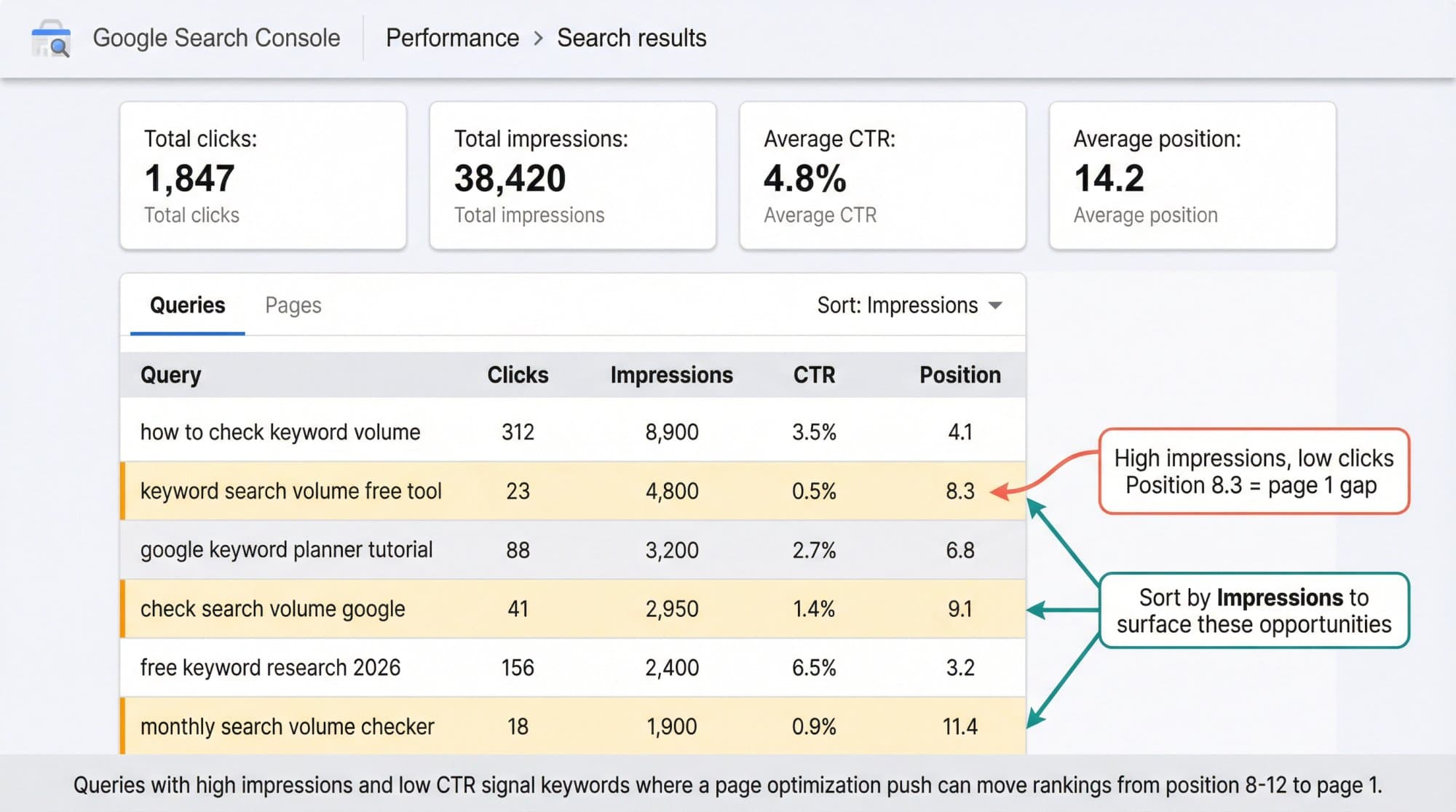
Google Search Console doesn't estimate the whole market. It shows how your site actually performs in Google. Google says its performance reports show impressions, clicks, CTR, and average position for the queries and pages tied to your property. That makes Search Console better than a generic third-party estimate when you want to find keywords you're already close to winning.
How to Find Keywords in Google Search Console
- Open Search Console
- Go to Performance then Search results
- Click the Queries tab
- Sort by Impressions
- Look for terms where impressions are high but clicks are low, average position suggests you're close to page one, or an existing page is already getting seen for related queries

Google's guidance says you can use the Queries and Pages tabs to see what search queries show your site and which pages perform best. You can also filter by page, country, search type, and more.
Learning how to use Google Analytics alongside Search Console gives you a complete picture: Search Console shows impressions and position, while Analytics shows what happens after the click.
Why Search Console Matters More Than Ever in 2026
When to Use Google Search Console for Keyword Research
Search Console is perfect for:
- Finding "almost there" keywords (position 11-20, one optimization away from page one)
- Updating old pages instead of creating new ones
- Spotting queries with high impressions and weak CTR (then using those insights to improve your click-through rate)
- Validating whether Google already sees your page as relevant for a topic
The first-principles insight here is simple: if Google is already showing your page for a keyword family, you have evidence of topical fit. Improving that page is usually a better bet than starting from zero. This is especially true when building topical authority in a niche. Existing impressions signal that Google already sees you as a relevant source.
Google Search Console's Biggest Limitation
Search Console is property-specific. It doesn't tell you the total monthly search demand across the internet. It tells you how often users saw or clicked your site. That's incredibly useful, but it answers a different question than "what's the total market demand for this keyword?"
Free Keyword Research Tools: Get Fast Search Volume Estimates

After Google's own tools, the fastest free route is a third-party keyword database. These tools give you a cleaner interface, faster keyword expansion, and extra context like keyword difficulty, related questions, SERP snapshots, and CPC estimates.
Several free options exist in this space. Many provide monthly search volume, keyword difficulty, and CPC without requiring sign-up. Others are powered by clickstream data, or provide monthly organic search estimates with supporting context.
What we've found at Outrank: most people who check keyword search volume don't just want a number. They want to know what to do with that number. That's why we built our free Blog Keyword Generator, which goes beyond raw volume to help you identify keywords with real ranking potential for your specific site. Instead of checking one keyword at a time across multiple tools, you get a prioritized list of opportunities with search volume and difficulty metrics built in.

If you want a broader set of free SEO tools before committing to a paid platform, this stage of your workflow is the right time to test what fits.
How to Use Free Keyword Research Tools Effectively
- Pick a tool (we'd recommend starting with our free Blog Keyword Generator for a quick, integrated view)
- Enter your seed keyword or website URL
- Review the monthly volume estimates
- Expand into related questions and long-tail variations
- Cross-check promising terms against Google Keyword Planner or Trends if the volume looks important to your decision
Once you've built a broader list, the next step is organizing it properly. The keyword research example from real campaigns shows how to sort by intent and difficulty so you can prioritize what to write first.
When Free Keyword Tools Are the Right Choice
This is the best method when you want speed. It's also the best way to expand one seed keyword into a list of realistic content opportunities without paying for a full SEO platform. For those running programmatic SEO at scale, efficient keyword expansion becomes essential. You need a fast way to validate volume across hundreds of potential targets.
The Mistake Most People Make with Free Keyword Tools
They treat third-party volume as if it were measured with a laser. Don't do that.
Treat third-party numbers as decision ranges, not courtroom evidence. If one tool says 900 and another says 1,200, the useful conclusion is usually "this keyword has real demand," not "one of these tools is lying."
If you're specifically trying to find keywords with low competition, a combination approach works best: free tool for speed, Keyword Planner for baseline confirmation. The guide to finding low-competition keywords walks through exactly that process.
Free Keyword Tool Limitations to Know
Third-party databases are still estimates. They can be excellent for prioritization, but they are not Google's own ground truth.
Browser Extensions: Check Search Volume While You Browse Google

If you do keyword research regularly, a browser extension can be a huge time saver.
Install an extension, search Google like you normally would, and see estimated search volume data right alongside the actual results. No tab-switching, no copying keywords between tools.
Several free browser extensions work across dozens of countries, showing search volume, suggestions, CPC, and related data directly in Google's search results.
How to Use a Keyword Research Browser Extension
- Install a keyword research browser extension
- Search your keyword in Google
- Read the volume estimate and related suggestions in the side panel
- Save or export the keywords you want to keep
- Use it as a rapid filter, then validate important terms in another tool
When a SERP Extension Makes Sense
This method is great when you want to research at the speed of thought. Instead of jumping between tabs, you can inspect the actual SERP, look at ranking pages, and check estimated demand all in one place. It's a natural fit if you're doing competitor website analysis. You can quickly see what's ranking, what volumes look like, and where gaps might exist in the existing results.
Browser Extension Limitations for Keyword Research
A SERP extension is still just an estimate layered on top of Google results. It's fantastic for speed, but you should still sanity-check valuable keywords with Keyword Planner, Trends, or Search Console before committing resources. For tracking keyword rankings long-term, dedicated rank tracking is more reliable than a browser extension.
Bonus: The Google Ads Search Terms Report

This doesn't count as one of the five free methods because it assumes you're already running ads. But it's too valuable not to mention.
Google's Search Terms report shows the actual searches that triggered your ads. Google says it includes search terms used by a significant number of people that resulted in impressions and clicks. It also notes that some lower-volume queries can be omitted for privacy reasons.
Why is this useful? Because it gives you the language people actually used, not the language you guessed they might use. If you already spend on search ads, this is one of the best ways to find bottom-funnel queries for SEO content and landing pages. Combining this with a solid keyword gap analysis against your competitors can reveal high-value opportunities you'd never find through volume data alone.
Our Recommended Free Workflow for Checking Keyword Search Volume in 2026
If you had to do this with zero budget, here's the stack we'd actually recommend:

- Start in Google Keyword Planner to confirm there's baseline demand
- Check Google Trends to see whether the topic is growing, seasonal, or fading
- Use a free keyword research tool (like Outrank's Blog Keyword Generator) to get a fast second opinion and expand related terms
- Search the term in Google with a browser extension to inspect the real SERP while you research
- If you have a site, trust Search Console most for identifying practical, near-term opportunities on keywords you already touch
- Rough demand (Keyword Planner)
- Trend direction (Google Trends)
- Related keyword expansion (free keyword tools)
- Live SERP context (browser extension)
- Real-world visibility for your site (Search Console)
That's how you stop guessing and start making decisions backed by real data.
How to Decide Whether a Keyword Is Actually Worth Targeting

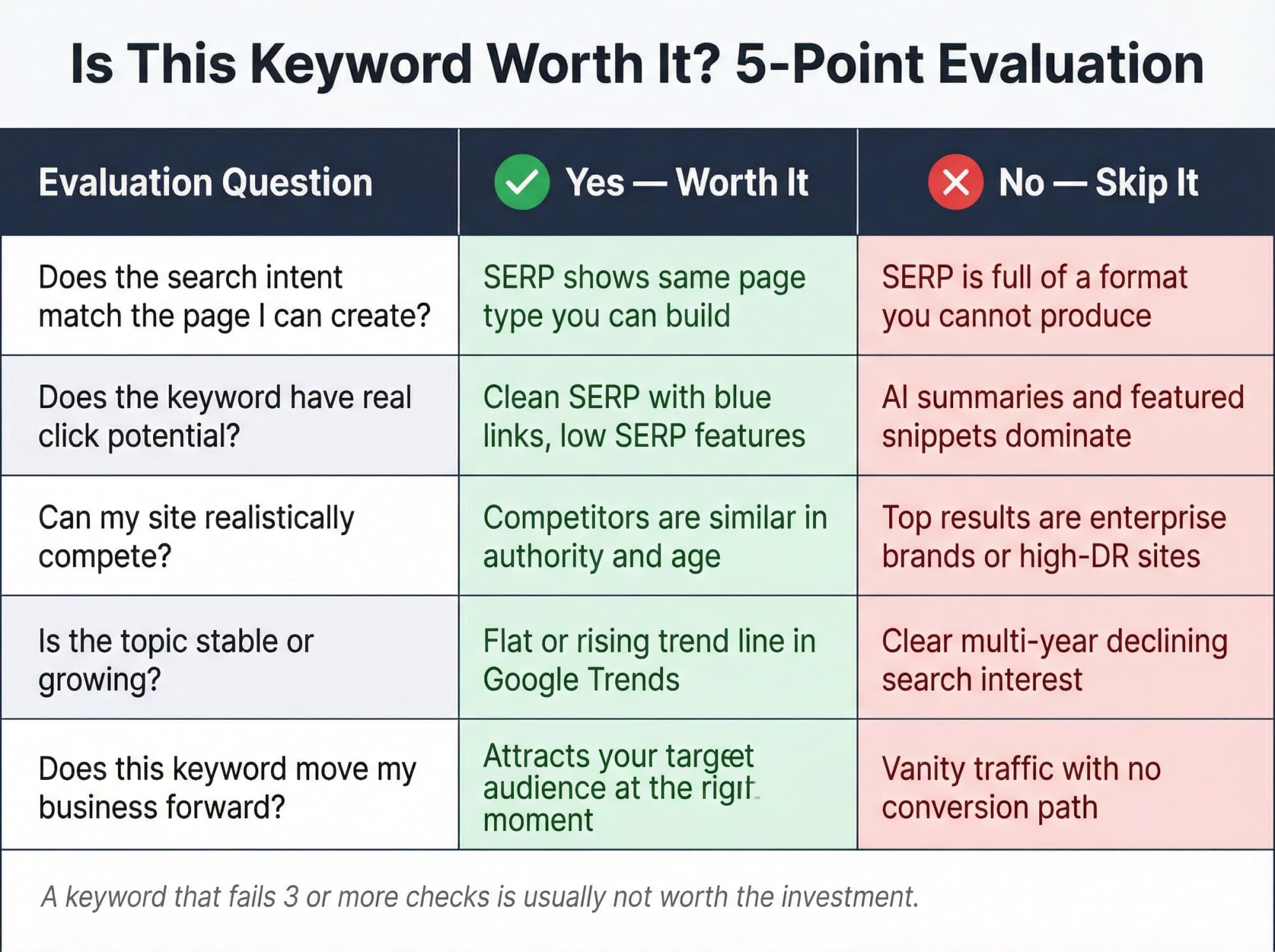
Once you have the volume, you're only halfway done. The number means nothing without context. Ask these five questions before committing to any keyword.
1. Does the Search Intent Match the Page You Can Create?
A keyword is only valuable if you can build the right kind of page for it. If the SERP is full of product pages, a blog post will struggle. If the SERP is full of tutorials, a landing page will miss the mark. Always check what's actually ranking before you write. This is part of why effective keyword targeting involves more than just looking at volume numbers. This keyword competitor analysis guide shows how to combine intent and competition into your decisions.
2. Does the Keyword Have Click Potential?
In 2026, some SERPs are crowded with AI summaries, featured snippets, videos, maps, shopping modules, and "People also ask" boxes. That means the keyword may have demand but weak click opportunity. Pew's July 2025 analysis found lower click-through to traditional results on pages with AI summaries, so volume alone doesn't cut it anymore. Understanding how to get featured snippets can help you capture that zero-click territory rather than losing traffic to it.
3. Can Your Site Realistically Compete?
A keyword with smaller demand but weaker competitors is often the smarter target. Don't chase a giant keyword just because the number looks exciting. If you're serious about finding low competition keywords that are realistically winnable for your site, real-world keyword research examples from actual campaigns can be more instructive than any abstract framework.
4. Is the Topic Stable or Rising?
Use Google Trends for this. A flat or rising curve is usually healthier than a clear long-term decline. Combining Trends data with a thorough SEO keyword competitive analysis gives you both directional insight and a realistic read of how contested the space is.
5. Does the Keyword Move the Business?
A keyword isn't good because it's searched. It's good because it can bring the right person to the right page at the right moment. That sounds obvious, but most bad keyword research ignores it completely. The goal is ultimately to increase website traffic organically in ways that connect to real business outcomes, not just vanity metrics.
Keyword Research Mistakes That Kill Your Rankings

Believing there's an "exact" magic number somewhere. There usually isn't. There are only more useful and less useful estimates. Get comfortable with ranges.
Chasing the biggest volume. Big volume often means broad intent, stronger competition, and weaker conversion quality. A keyword with 500 monthly searches and clear purchase intent can outperform a 50,000-search informational query every time. This is the core principle behind long-tail keyword research: targeting specific, lower-volume terms that convert at much higher rates.
Ignoring geography. Search demand changes dramatically by country, city, and language. Google Keyword Planner explicitly lets you filter for those variables for a reason. Use it.
Using Google Trends as if it were exact volume. It's a relative index, not a monthly search count. Great for direction, not for precision.
Three more mistakes that are easy to make:
- Creating a brand-new page when Search Console is already telling you what to improve. If an existing page already has impressions for a keyword cluster, update that page first. It's usually faster and more effective than starting from scratch. Understanding how to do SEO competitor analysis helps you see which gaps your existing content could fill without starting over.
- Throwing out "zero-volume" keywords. Some low-volume, local, or emerging queries never show cleanly in free tools. That doesn't mean they're useless. Some of the most profitable SEO content targets keywords that traditional tools barely register. This is especially true for creating long-tail keywords built around very specific buyer questions that are underrepresented in volume databases.
- Neglecting keyword clustering. Instead of treating every keyword as a standalone target, grouping related terms lets you build content that ranks for multiple related queries from a single page, which dramatically improves the efficiency of your content investment.
How Outrank Automates Keyword Research (Skip the Manual Work)

You just walked through five different free methods, each with their own interface, quirks, and limitations. That's a lot of tabs to keep open.
We kept running into this problem while building Outrank: keyword research is just the first step. After you check search volume, you still need to evaluate difficulty, plan content, write articles, optimize for SEO, and publish. Most teams spend so much time on the research phase that they never get to the part that actually drives results: published, optimized content.
That's exactly why we built Outrank as an end-to-end SEO automation platform. Instead of bouncing between Google Keyword Planner, Trends, Search Console, and a handful of free checkers, you get:
- AI-powered keyword discovery that surfaces high-traffic, low-difficulty opportunities specific to your niche
- Our free Blog Keyword Generator that analyzes your site and generates relevant keywords with search volume and difficulty metrics
- Automated content creation producing up to 30 SEO-optimized articles per month
- Direct publishing to WordPress, Webflow, Shopify, Framer, and more (through our WordPress plugin, Framer integration, or webhook setup), so nothing sits in a Google Doc waiting for someone to copy-paste it
- Built-in authority building through our Backlink Exchange network and directory submission service
The five methods in this guide are solid. They work. But if you find yourself spending hours every week toggling between tools just to decide what to write about, Outrank was built to collapse that entire workflow into something that runs on autopilot. If you're evaluating the broader category of AI SEO tools, our roundup of the top options lays out how the landscape looks.
Want Expert-Level SEO Without the Grind? Meet Outrank Agency

Maybe you've read this whole guide and thought: "This is helpful, but I don't have time to do keyword research, write content, optimize it, and publish it every single day."
Outrank Agency is our done-for-you SEO content service. We don't just automate keyword research. We assign a personal content manager, industry experts, and SEO specialists to your account. Every article is human-reviewed, fact-checked, and optimized before it goes live on your site. 30 expert-crafted articles per month, each reviewed by an industry specialist.
And the results speak for themselves:
- Comprehensive keyword research and competitor gap analysis by SEO experts
- A content calendar planned 3 months ahead (you approve it, we execute)
- 30 articles per month, each refined by industry specialists
- SEO specialist optimization for every piece (structure, LSI keywords, internal links, on-page signals)
- A dedicated Slack channel for fast communication and revisions
- Direct CMS publishing without your involvement
Pricing: $1,499/month. Only 5 new clients accepted per month to protect quality. Cancel anytime.
If you're serious about scaling SEO content without building an entire in-house team, book a demo and see how it works. Or check out the full details at outrank.so/agency.
Frequently Asked Questions

Can I Check Keyword Search Volume for Free?
Yes. The best free options are Google Keyword Planner, Google Trends, Google Search Console, free third-party keyword tools, and free SERP extensions. Each solves a different part of the problem, and this guide walks through all five. For an all-in-one approach, our free Blog Keyword Generator combines volume, difficulty, and keyword ideas in a single interface.
What Is the Most Accurate Free Source for Keyword Search Volume?
For broad Google demand, Google Keyword Planner is the closest thing to an official baseline since it pulls from Google's own search data. For your own site specifically, Google Search Console is often more useful because it shows real impressions and clicks for your property, not just estimated market demand. You can learn more about checking your keyword position using the Google API if you want to automate this data retrieval.
Why Do Different Keyword Tools Show Different Volumes?
Because they use different methods. Google Keyword Planner rounds data and bases search volume stats on exact keyword matches. Google Trends normalizes interest to a 0 to 100 scale. Third-party tools often use clickstream or proprietary data models. Search Console reports your own site's visibility. They're each measuring something slightly different.
Is Google Trends Enough on Its Own?
No. Google Trends is excellent for direction and seasonality, but it's not an exact monthly search-volume tool. Pair it with Keyword Planner or a free keyword database for the most complete picture.
Does Keyword Search Volume Still Matter in 2026?
Yes, but not by itself. It still tells you whether demand exists. What changed is that demand doesn't always translate into clicks the way it used to. AI summaries, richer SERPs, and zero-click behavior mean you also need to judge click potential, search intent, and ranking feasibility alongside raw volume. Building semantic SEO into your content strategy helps ensure your pages satisfy user intent beyond just matching keywords.
What's the Difference Between Search Volume and AI Prompt Volume?
Traditional keyword search volume measures how often people type a query into Google (or another search engine). AI prompt volume measures how often people ask similar questions to AI tools like ChatGPT, Claude, or Gemini. Some platforms now track these separately, and the numbers can differ significantly. When you're checking keyword search volume, make sure you know which metric you're looking at.
How Does Outrank Help with Keyword Research?
Outrank automates the entire keyword-to-published-content pipeline. Our free Blog Keyword Generator helps you find keywords with real ranking potential, and the full platform handles content creation, SEO optimization, and direct CMS publishing. Instead of toggling between five free tools to check one keyword, you get a complete system that handles research, writing, and publishing on autopilot. If you want to understand how AI tools for SEO content generation work under the hood, we've written about that too.
The bottom line: don't try to find the perfect keyword volume number. Try to build the best decision from multiple signals. Use Keyword Planner for baseline demand, Trends for direction, Search Console for real visibility, free keyword tools for speed and expansion, and SERP extensions for workflow efficiency.
That stack is enough to do very solid keyword research for free. And once you've validated a topic, Outrank can handle everything that comes next: turning that keyword into a published, optimized article without the manual grind. Whether you want to scale your content marketing or simply rank on Google's first page for the keywords that matter most to your business, the research foundation you've built here is your starting point.
Tool features, free-access availability, and cited statistics were verified against live public pages on March 30, 2026. Free plans and limits change frequently, so re-check the tool page before building any workflow into your SOPs.
Written by