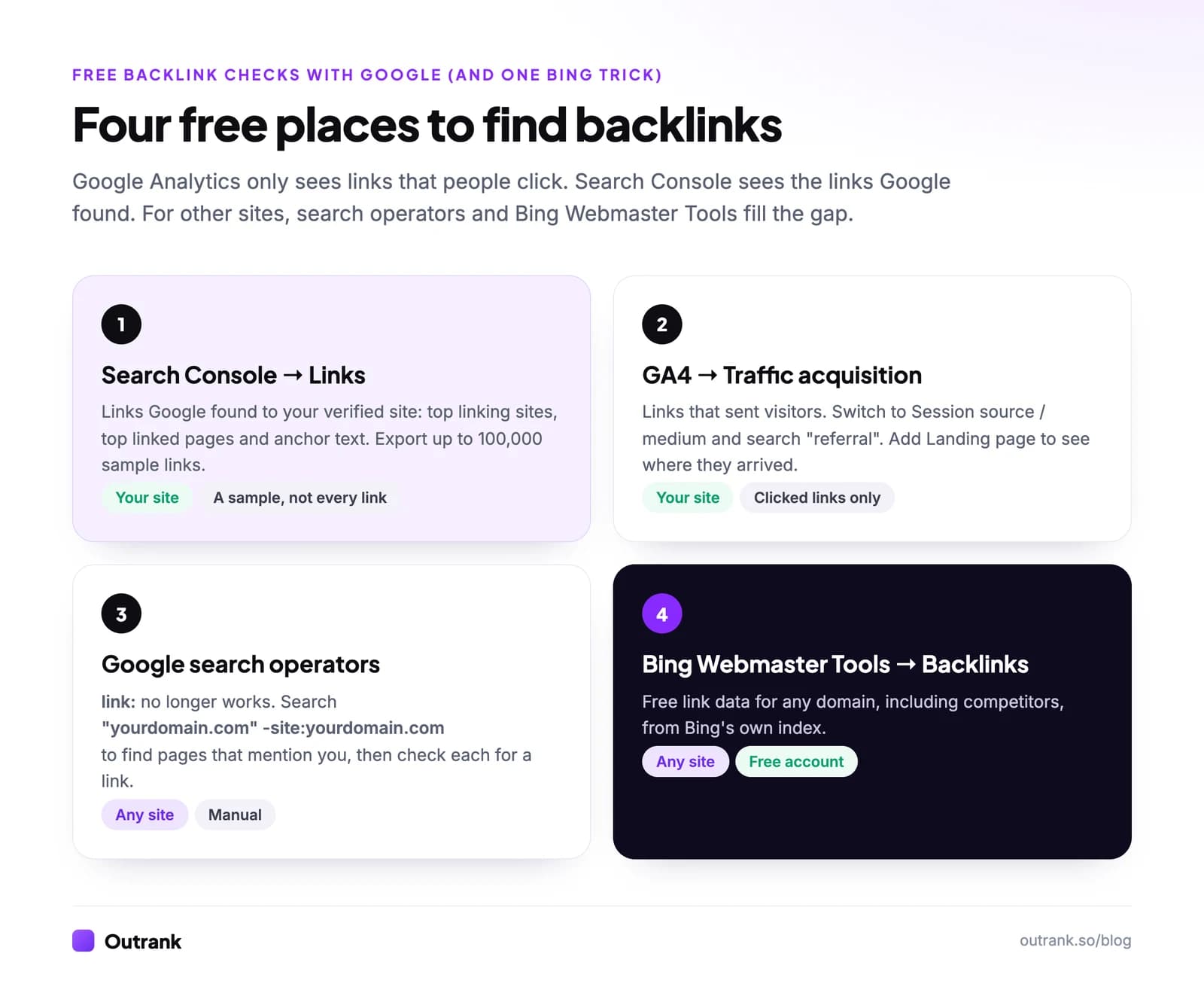
Google Analytics can't show you a list of your backlinks. GA4 shows referral traffic: visits that arrived because someone clicked a link on another website. To see them, open Reports → Acquisition → Traffic acquisition, change the table's dimension to Session source / medium, and type referral in the search box. Every row like example.com / referral is a site whose link sent you visitors.
For the backlinks Google has actually found, including the ones nobody clicks, use Google Search Console → Links. That report is Google's own free backlink checker. This guide covers both, plus how to find backlinks with Google search, how to check a competitor's links for free, and how to turn GA4's referral data into link-building decisions.
Key takeaways
- GA4 shows referral traffic, not a backlink list. Path: Reports → Acquisition → Traffic acquisition → Session source / medium → search for referral.
- Search Console's Links report is Google's free backlink checker for your verified site. It lists top linking sites, top linked pages and anchor text, and exports up to 100,000 sample links.
- Google's link: search operator no longer works; Google's John Mueller advised against using it back in January 2017.
- For a competitor's backlinks, Bing Webmaster Tools lists backlinks for any site with a free account. Ahrefs and Semrush offer limited free checks.
- Neither GA4 nor Search Console tells you whether a link is nofollow. Check the linking page or run the link through a link checker.
Can Google Analytics show backlinks?
Only some of them. A backlink is a link from another website to yours. GA4 only records one when three things happen: someone clicks it, the page they land on loads your GA4 tag (with consent where required), and the browser passes along the site they came from. So GA4 answers "which links send visitors?", not "which links exist?".
Each question has a better free tool:
| Your question | Best free tool |
|---|---|
| Which websites link to me? | Google Search Console → Links |
| Which links actually send visitors? | GA4 → Traffic acquisition |
| Which linked visitors sign up or buy? | GA4, with key events set up |
| What anchor text do other sites use? | Search Console → Top linking text |
| Is a link nofollow, sponsored or UGC? | The linking page's HTML, or a link checker (GA4 and Search Console don't show it) |
| Who links to my competitor? | Bing Webmaster Tools, or a paid backlink tool |
How to find backlinks in Google Analytics 4
The Traffic acquisition report shows which sources start sessions on your site. Six steps turn it into a referral (backlink traffic) report:
- 1
Open Traffic acquisition
In GA4, go to Reports → Acquisition → Traffic acquisition. If you don't see it, an editor can add it back to the report navigation. - 2
Pick a long date range
Use the last 90 days or more. Referral traffic is spiky; one newsletter mention or roundup can send a burst of visits and then nothing for weeks. - 3
Switch the dimension to Session source / medium
The table opens on Session default channel group. Click that column header's drop-down and choose Session source / medium. - 4
Keep only referrals
Typereferralin the search box above the table. For a cleaner view, add a filter where Session default channel group exactly matches Referral. - 5
Sort by quality, not volume
Add Engaged sessions, Engagement rate and Key events. GA4 counts a session as engaged if it lasted 10 seconds or more, had a key event, or had 2 or more page views. - 6
Add the landing page
Click the + next to the dimension drop-down and add Landing page + query string as a secondary dimension. Now each row shows which site linked to which of your pages.
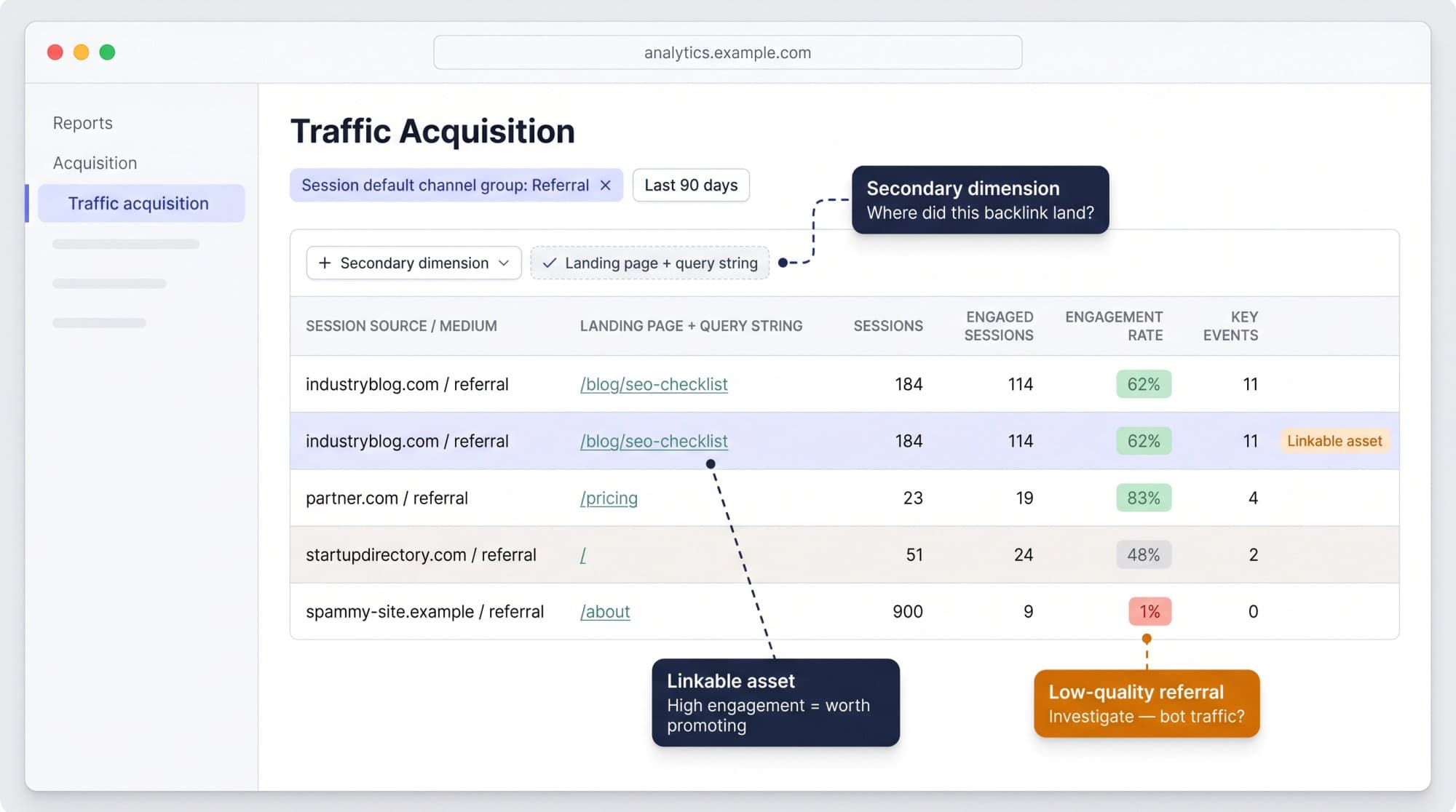
How to read what you see:
| Row in GA4 | What it usually means | What to do |
|---|---|---|
industryblog.com / referral landing on /blog/seo-checklist | An editorial link sends readers to a guide | Keep the page updated; pitch that site again |
partner-directory.com / referral landing on / | A listing points to your homepage | Ask for a deeper link to the most relevant page |
checkout.stripe.com / referral | Visitors returning from your payment provider | Not a backlink. Add it to unwanted referrals (below) |
| High sessions, near-zero engagement, unknown domain | Spam or bot referrals | Exclude it from your analysis |
Referral is only one of the traffic sources your site depends on, so expect it to be a small slice next to organic search and direct. If you're new to GA4 reports in general, start with our guide on how to use Google Analytics.
Find the exact page that links to you (Page referrer)
Traffic acquisition shows domains. To see the actual linking URL, use the Page referrer dimension in an exploration:
- Go to Explore → Free form.
- Add the dimensions Page referrer, Landing page + query string and Event name; add Sessions or Views and Key events as metrics.
- Put Page referrer and Landing page + query string in rows.
- Add three filters: Event name exactly matches
page_view; Page referrer does not contain your own domain (otherwise internal clicks flood the table); Page referrer does not exactly match(not set).
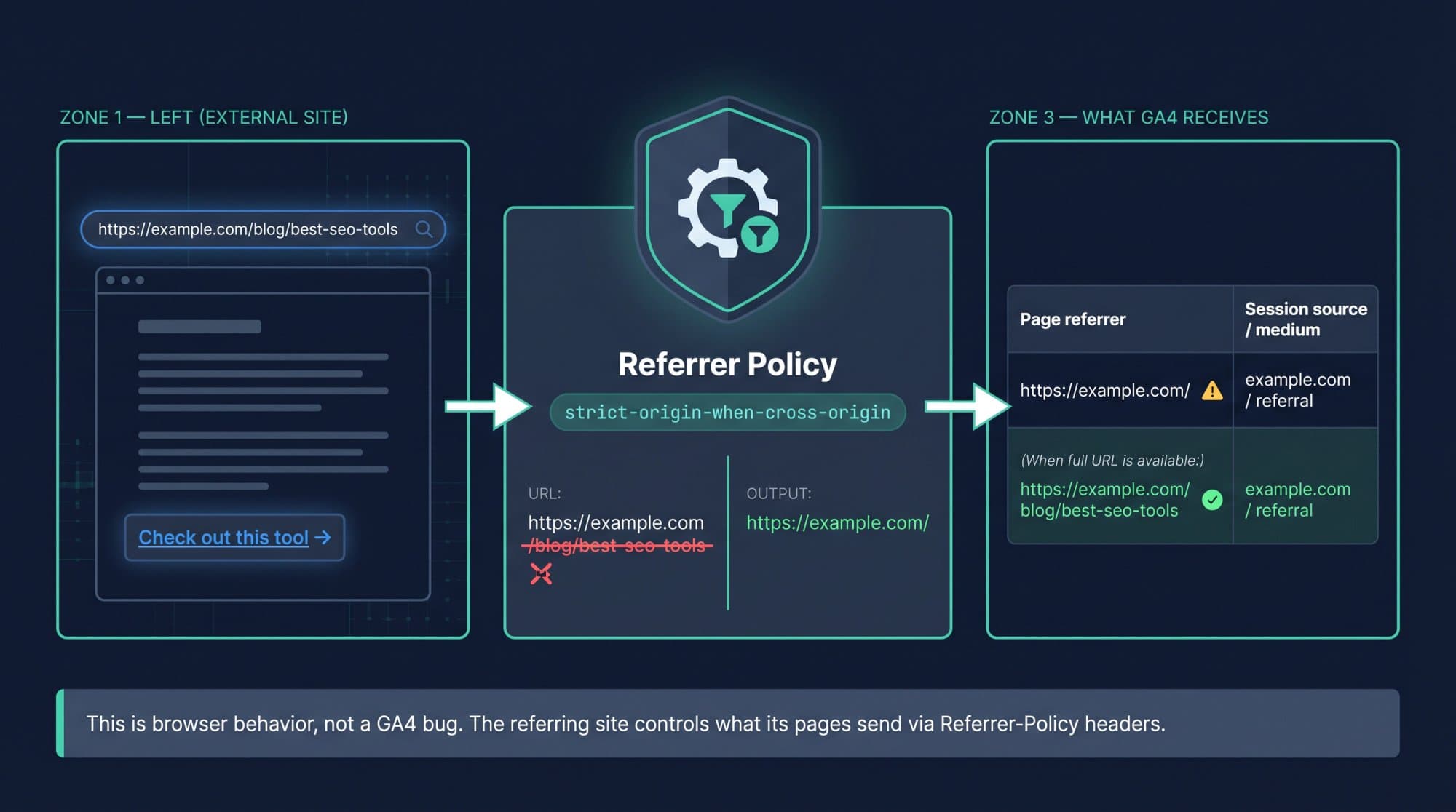
Expect many rows to show only https://example.com/ instead of the full article URL. That isn't a GA4 bug. Modern browsers default to the strict-origin-when-cross-origin referrer policy, which sends only the origin when someone moves between two different HTTPS sites. GA4 also caps page_referrer at 420 characters.
How to find backlinks in Google Search Console
Search Console's Links report is the closest thing Google offers to a backlink checker, and it's free for any site you've verified. It shows links Google has found, whether or not anyone clicks them.
- 1
Open the Links report
In Search Console, select your property and click Links in the left menu. - 2
See your most-linked pages
Under External links, open Top linked pages. Click any page to see which sites link to it. - 3
See who links to you
Open Top linking sites for the root domains with the most links to your site. Click a domain to see which of your pages it links to. - 4
Check anchor text
Open Top linking text for the words other sites use in links to you. Case-insensitive duplicates are combined. - 5
Export the link list
Click Export external links at the top of the report. You can export the latest links Google discovered or a wider sample, up to 100,000 rows; single tables export up to 1,000 rows.
Know its limits before you treat it as a full audit:
- It's a sample. Google says the report isn't a comprehensive list of every link to your site.
- It doesn't show nofollow. Links are listed the same way whether or not they pass ranking signals.
- It groups by canonical URL, so links to a parameter or duplicate URL show up under the canonical page.
How to find backlinks using Google search
The old shortcut, link:yourdomain.com, is gone. Google's John Mueller told SEOs not to use the link operator in January 2017, and it hasn't been a reliable backlink check since.
What still works in Google search is finding pages that mention you, which often link to you:
"yourdomain.com" -site:yourdomain.comfinds pages that mention your domain, excluding your own site."Your Brand Name" -site:yourdomain.comfinds brand mentions. A mention without a link is an easy outreach target; our link reclamation guide covers the email to send."competitor.com" -site:competitor.comdoes the same for a competitor.
It's manual and far from complete, but it's free and it surfaces unlinked mentions that no backlink report will show.
How to check backlinks of any website for free
Search Console and GA4 only cover sites you own. For competitors, or for a second opinion on your own profile:
Free ways to check backlinks (October 2026)
| Whose backlinks | Cost | Best for | |
|---|---|---|---|
| Google Search Console | Your verified sites | Free | The links Google itself found, with anchor text |
| Google Analytics 4 | Your site, clicked links only | Free | Which links send engaged visitors and conversions |
| Bing Webmaster Tools | Any domain | Free account | A competitor's link profile, from Bing's index |
| Ahrefs Backlink Checker | Any domain | Free, limited view | A quick look at referring domains, top pages and anchors |
| Semrush | Any domain | Free plan, 10 reports a day | Occasional checks on a few domains |
| Outrank Backlink Monitor | Links you paste in | Free, no signup | Checking whether known links are live, nofollow, noindexed or gone |
Click a column header to sort.
Bing's tool is the underrated one: since its 2020 relaunch, the Backlinks section "lists backlinks for any site, including similar sites", and you don't need to verify a competitor's domain to look it up.
Cross-check GA4 referrals with Search Console
The two tools see different slices of the same link profile, so their numbers never match, and Google says not to expect them to: Search Console and Analytics measure different things. Combine them instead:
- Export Top linking sites from Search Console.
- Export your GA4 referral rows (Session source / medium, filtered to Referral) for the same period.
- Match the domains in a spreadsheet and label each one with the matrix below.
| Found in Search Console | Not in Search Console | |
|---|---|---|
| Sends GA4 referral traffic | Your best links. Get more placements like these. | A real link outside Google's sample, or a tracking artifact. Check it manually. |
| Sends no GA4 traffic | Normal for most links. Keep it if relevant; it can still help rankings. | Nothing to act on. |
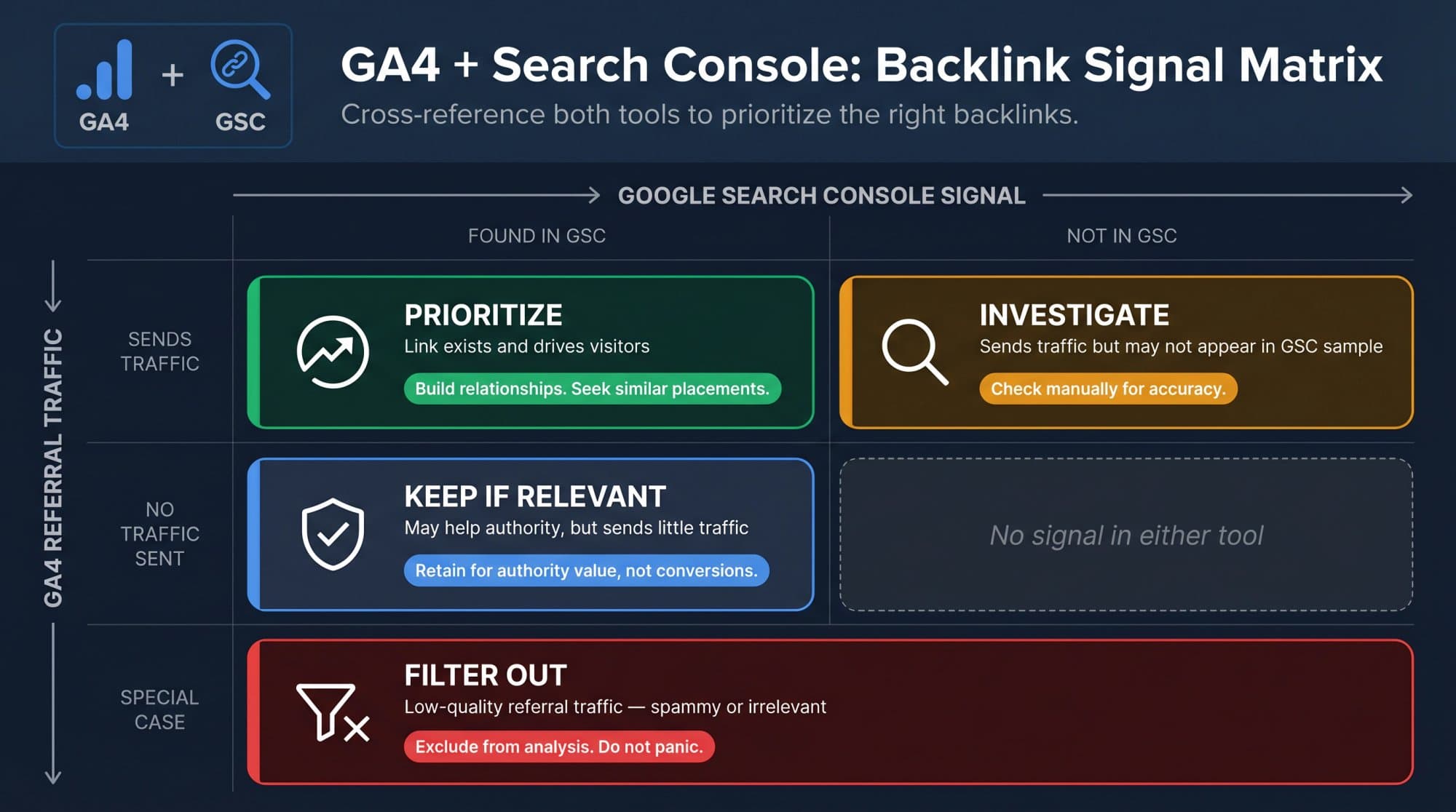
A link that sends no clicks isn't worthless. Most links pass authority quietly; GA4 is the judge of visitor behavior, not of link value. For how much authority you actually need, see how many backlinks you need to rank.
Find backlinks that point to broken pages
Links that land on a 404 page waste the visit and the link. Two ways to catch them:
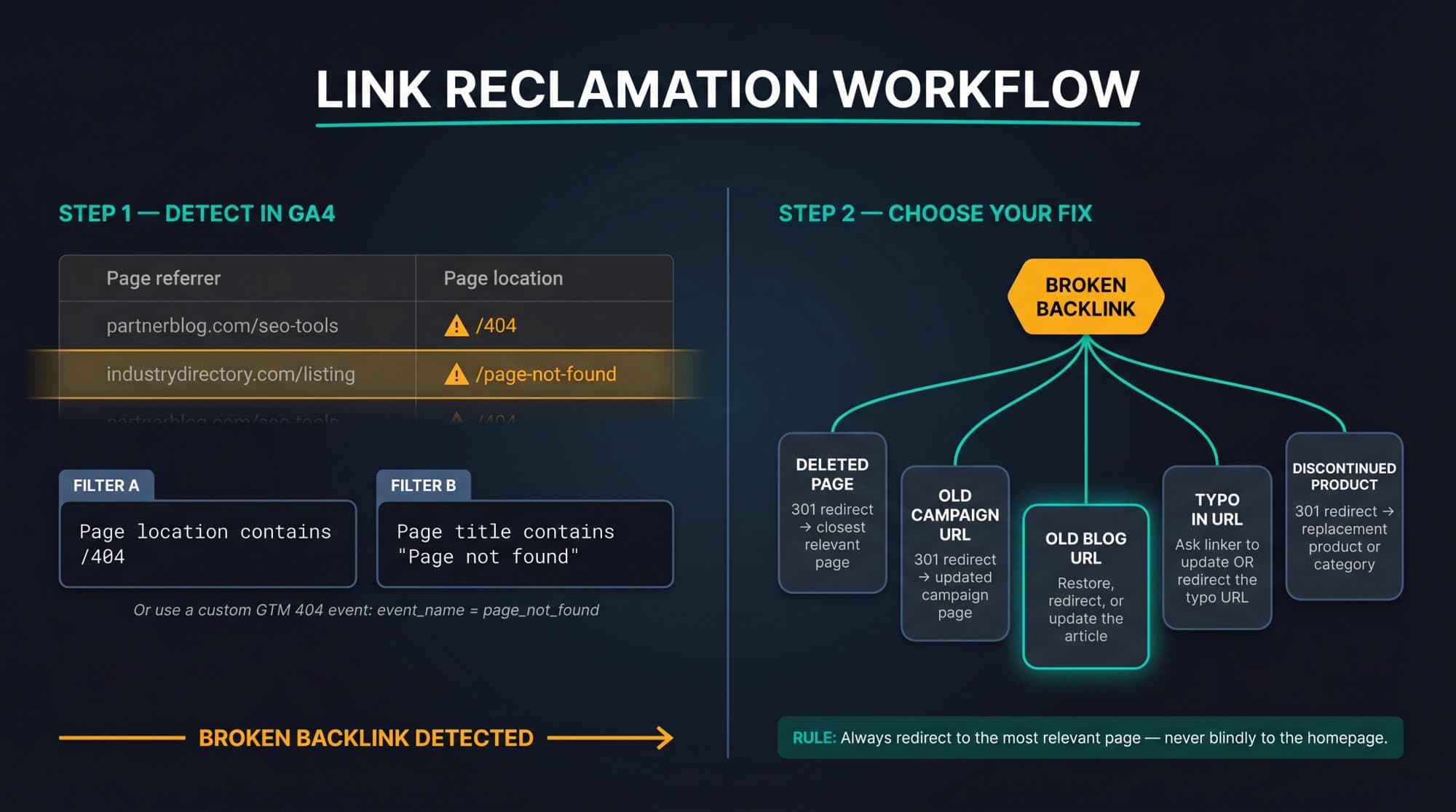
- In GA4: build the Page referrer exploration above, then filter Page title for your 404 page's title (for example "Page not found"). If your 404 template doesn't have a distinct title, fire a custom
page_not_foundevent from Google Tag Manager and filter on that. - In Search Console: export Top linked pages and check that each target URL still returns a 200 status. Any target that 404s or redirects to the homepage is a reclamation opportunity.
| Problem | Fix |
|---|---|
| External link points to a deleted page | 301 redirect to the closest relevant page |
| Link points to an old campaign URL | Redirect to the current version of the campaign |
| Link has a typo in the URL | Ask the site to correct it, or redirect the typo URL |
| Link points to a discontinued product | Redirect to the replacement product or its category |
Don't redirect every broken link to the homepage; send it to the page that matches what the linking site promised its readers. Our guides on fixing broken links and link reclamation walk through the full process.
Tag the links you control with UTM parameters
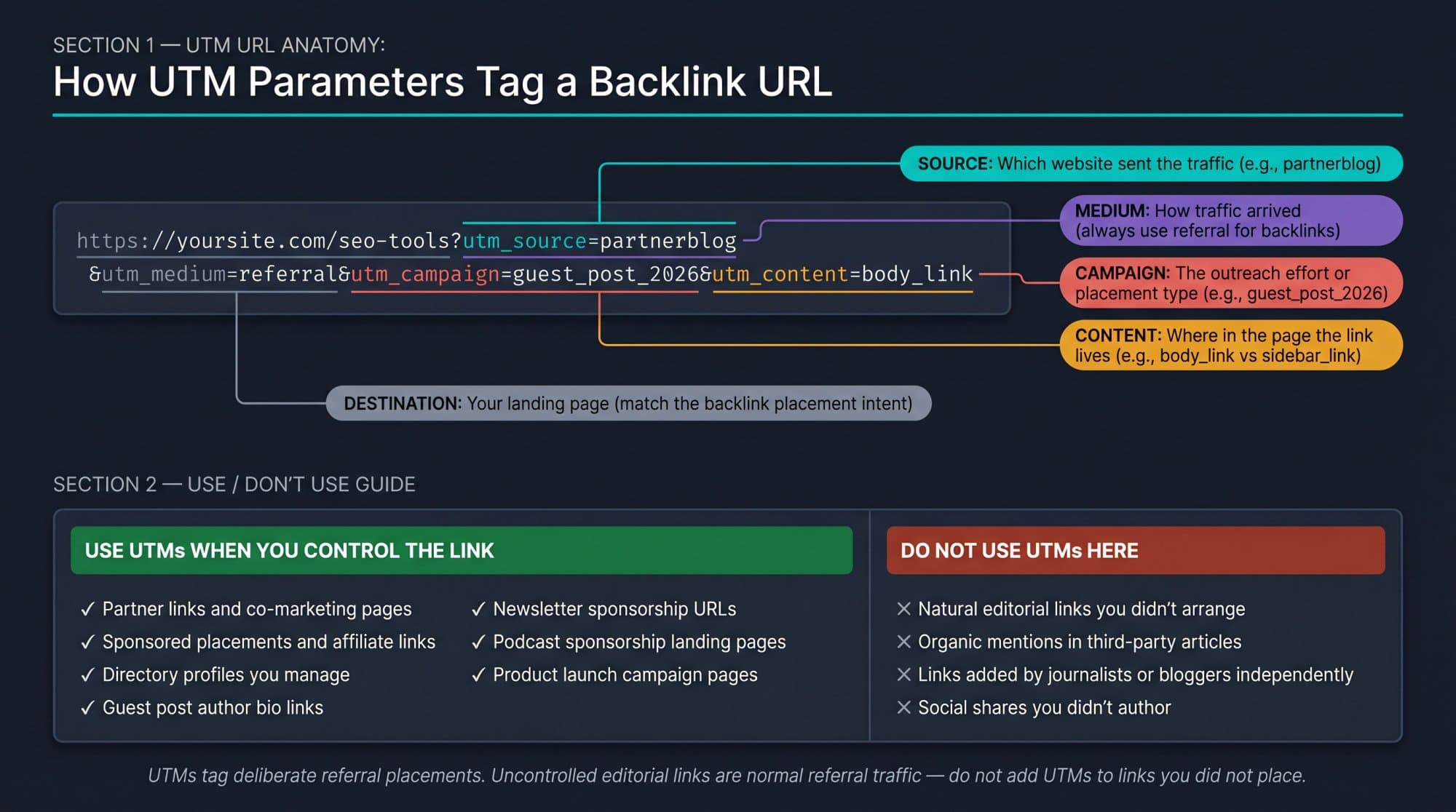
For placements you control (partner pages, directory profiles, sponsored newsletters, guest post bios), add UTM parameters so GA4 reports them as a named campaign instead of a generic referral:
https://yoursite.com/integrations?utm_source=partnername&utm_medium=referral&utm_campaign=partner_page_2026&utm_content=listingKeep utm_medium=referral if you want these visits to stay in the Referral channel; a medium like email or partner moves them elsewhere. Don't ask editors to add UTMs to natural editorial links: those links are fine as they are.
Remove fake referrals from the report
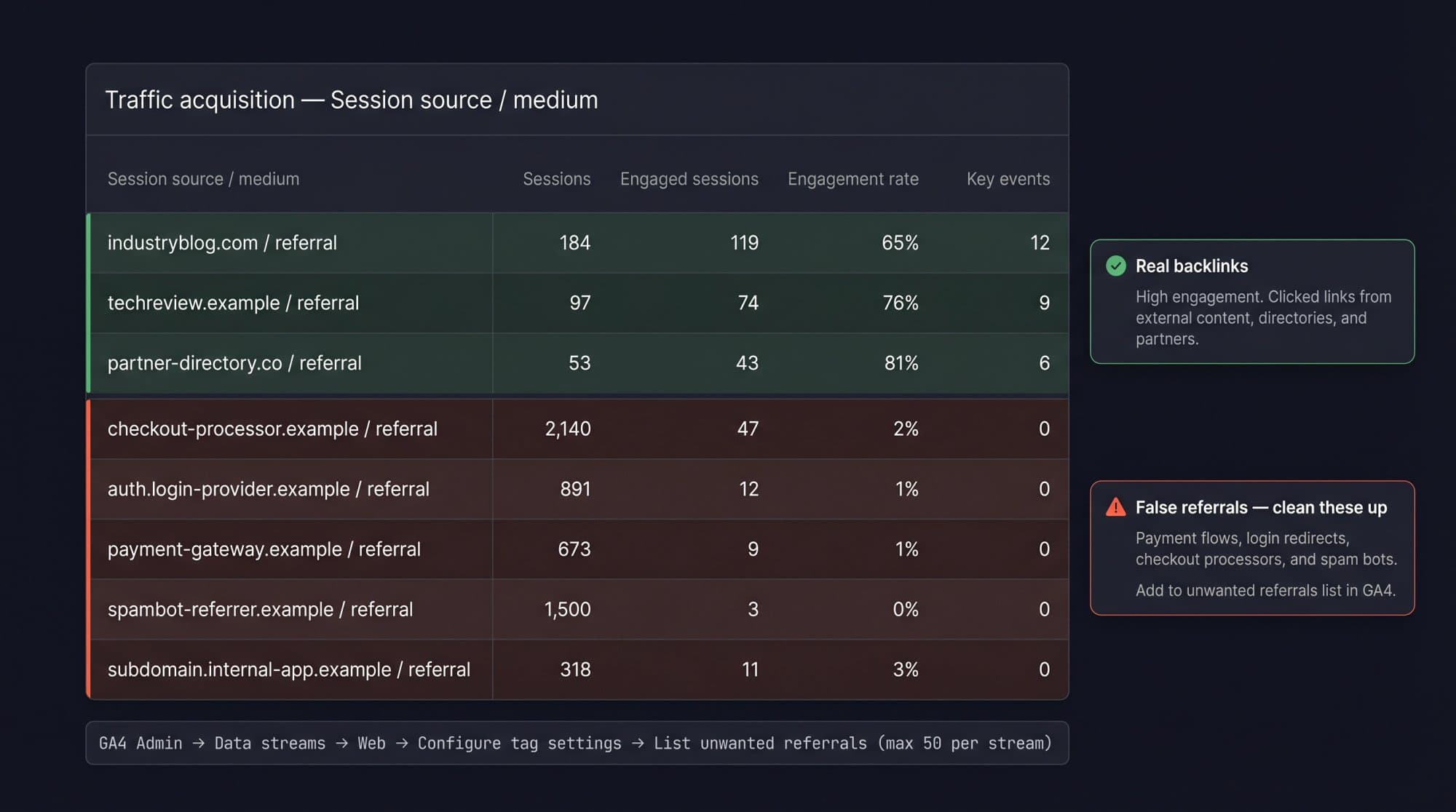
Not every referral is a backlink. Payment processors, login providers and booking engines show up as referrals when visitors leave your site and come back. Tell GA4 to ignore them:
Admin → Data collection and modification → Data streams → choose your web stream → Configure tag settings → Show all → List unwanted referrals
Google allows up to 50 unwanted referrals per data stream. Add your payment, checkout, authentication and booking domains, and anything else that's part of your own conversion path.
Why GA4 shows no backlinks (or fewer than you expect)
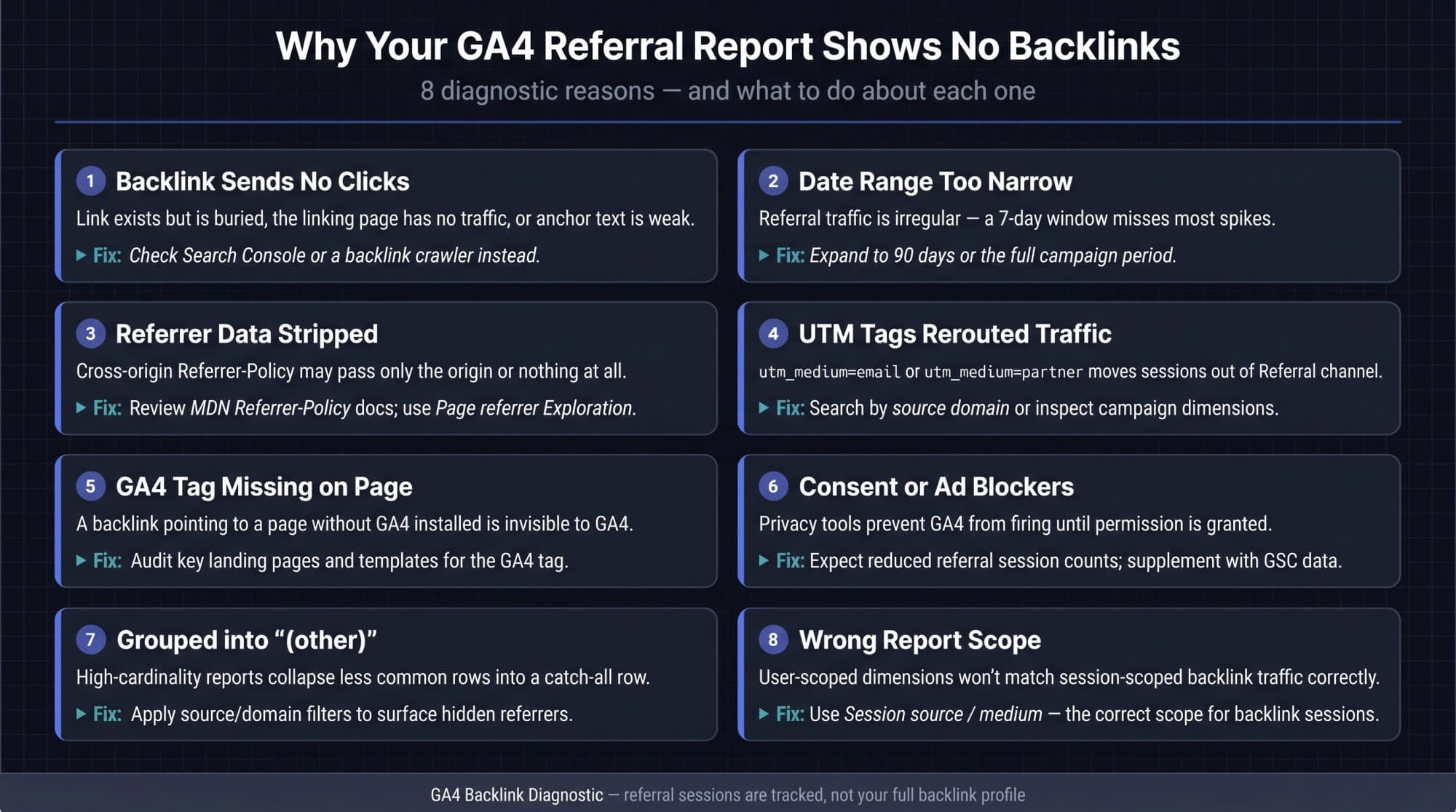
If your referral report is nearly empty, it's usually one of these:
- The links don't get clicks. A link on a page with no readers exists in Search Console and never appears in GA4.
- The date range is too short. Try 90 days or more.
- The referrer is stripped. Links with
rel="noreferrer", strict referrer policies and some apps pass no referrer, so the visit lands in Direct. - UTM tags moved the traffic. A link tagged
utm_medium=emailorpartnerwon't show under Referral. Search by source instead. - The landing page has no GA4 tag, or the visitor declined cookies or blocks analytics.
- Rows are grouped into "(other)". High-cardinality reports can collapse rare rows; an exploration with filters usually shows them.
- You're using the wrong scope. First user source shows how a user first arrived; for backlink visits, use session-scoped Session source / medium.
Turn referral data into link-building decisions
Score each referring domain once a quarter, then act on the score:
| Score | What GA4 shows | Action |
|---|---|---|
| 5 | Engaged visits and key events (sign-ups, demos, sales) | Get more links like this one: pitch another piece, ask for a partner page |
| 4 | Engaged visits, few conversions | Improve the landing page: clearer next step, internal links, a relevant offer |
| 3 | Some visits, average engagement | Monitor monthly |
| 2 | Few visits, low engagement | Ignore unless it grows |
| 1 | Spam, bots or your own tools | Exclude from analysis; add real tools to unwanted referrals |
Then look at which formats earn the score-5 links: tools, templates, statistics pages, comparisons. That tells you what to publish next. Our guide on how to build backlinks covers the outreach side.
Building those links by hand is the slow part. Outrank's backlink exchange places links to your site inside relevant articles on other sites in your niche, verifies each one, and guarantees 15 verified backlinks a month or your plan runs free until you get them; the median connected site gets 28 a month. Those links show up in Search Console like any other, and the ones readers click appear in your GA4 referral report.
Monthly backlink check
Interactive checklist
Monthly backlink check with Google's free tools
0/11
Search Console
0/3Google Analytics 4
0/5Act on it
0/3Your progress is saved in this browser, so you can come back to it later.
FAQ
Can I find all my backlinks in Google Analytics?
No. Google Analytics 4 only shows referral traffic: links that someone clicked, on a visit your GA4 tag recorded with the referring site passed along. Links that never get clicked don't appear. For a broader list, use Google Search Console's Links report, which shows a sample of the links Google has found.
How do I check backlinks in Google Analytics 4?
Go to Reports → Acquisition → Traffic acquisition, change the table dimension to Session source / medium, and search for "referral". Each row such as example.com / referral is a site whose link sent you visitors. Add Landing page + query string as a secondary dimension to see which page each link points to.
How do I find backlinks in Google?
Use Google Search Console. Open your property, click Links, and check Top linking sites, Top linked pages and Top linking text; you can export up to 100,000 sample links. Google's old link: search operator no longer works, but searching "yourdomain.com" -site:yourdomain.com finds pages that mention your domain.
Does Google have a free backlink checker?
Yes, for your own site: the Links report in Google Search Console is free and shows links Google has found, top linking sites and anchor text. It's a sample rather than a complete list and doesn't show nofollow status. Google doesn't offer a free backlink checker for other people's sites.
How do I find the backlinks of another website using Google?
Google's tools only show backlinks for sites you've verified. For another site, search "competitor.com" -site:competitor.com to find pages that mention it, or use Bing Webmaster Tools, which lists backlinks for any domain with a free account. Ahrefs and Semrush also offer limited free checks.
Why does GA4 only show the referring domain, not the exact URL?
Most browsers use the strict-origin-when-cross-origin referrer policy by default, which sends only the origin (like https://example.com/) when a visitor moves between two different HTTPS sites. Some sites send no referrer at all. GA4 records whatever the browser passes, so the full article URL is often unavailable.
Can GA4 show anchor text or tell me if a link is nofollow?
No. GA4 doesn't see anchor text or link attributes like nofollow, sponsored or ugc. Search Console's Top linking text report shows anchor text but not nofollow status. To check attributes, open the linking page's HTML or use a link checker such as Outrank's free Backlink Monitor.
Why does Search Console show links that GA4 doesn't?
Because a link can exist without sending tracked visits. Nobody may have clicked it in your date range, the referrer may have been stripped, or the visitor may have blocked analytics. Search Console reports links Google found; GA4 reports visits it measured, so the two never match exactly.
How often should I check backlink traffic in GA4?
Monthly is enough for most sites. Check weekly during an active PR push, a product launch, a directory submission campaign or guest posting, when new links are most likely to appear and to send bursts of referral traffic.