
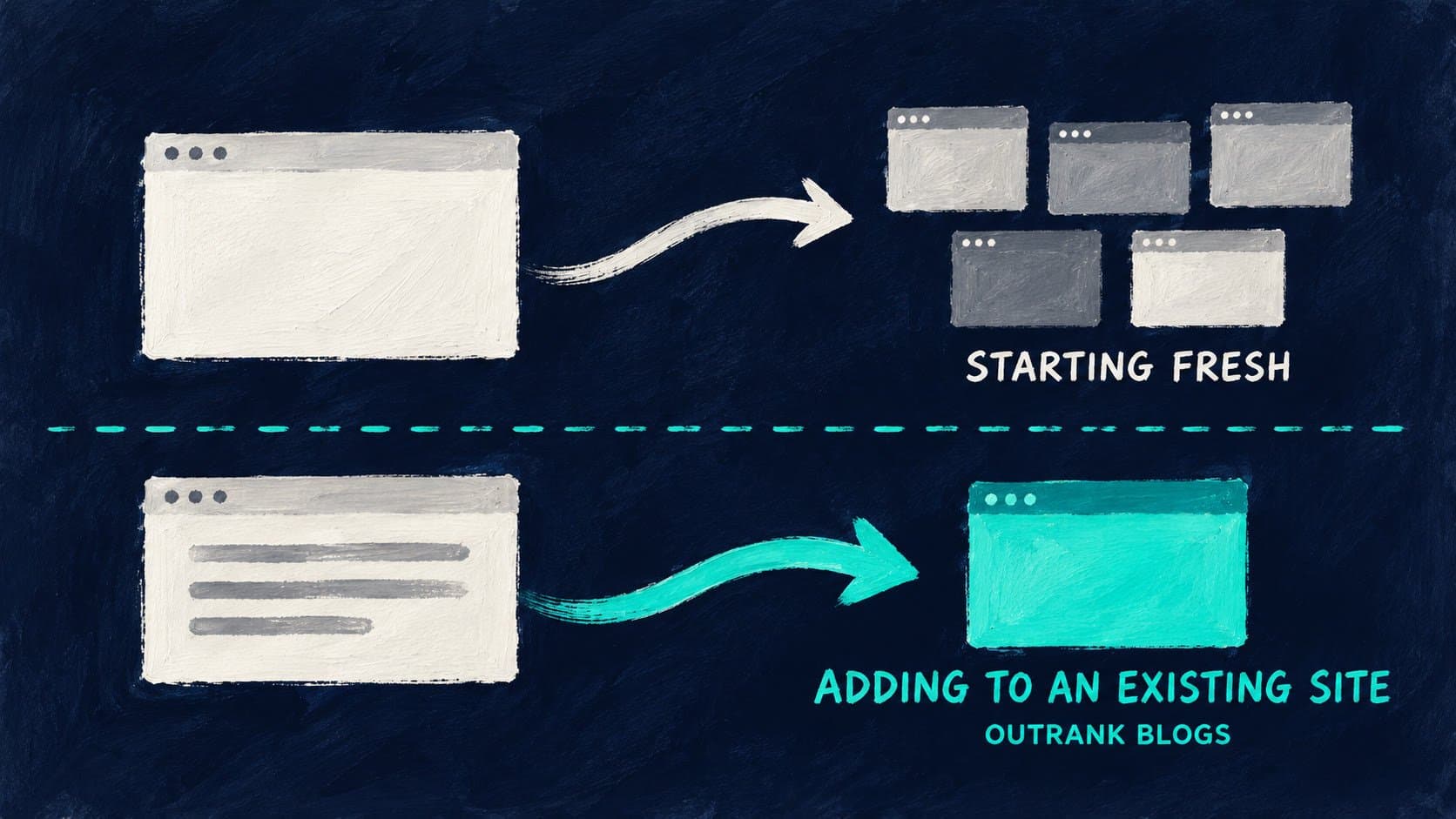
The best website builder for a blog depends on one question most comparisons skip: are you building a site from scratch with a blog inside it, or do you already have a site and need to add a blog without rebuilding anything? Those two situations point to different answers. If you are starting fresh, Wix and Squarespace cover everything in one interface. If you already have a site on Webflow, Vercel, or another framework and just need a blog at yoursite.com/blog, Outrank Blogs connects there without touching your existing stack.
Quick comparison: 5 website builders for blogs
| Platform | Free plan | Blog at yoursite.com/blog | SEO out of the box | Design quality | Starting price |
|---|---|---|---|---|---|
| Outrank Blogs | Yes (10,000 visits/month) | Yes, natively | Sitemap, structured data, IndexNow, RSS, llms.txt | Clean, minimal | $99/month (Organic Growth) |
| WordPress.com | Yes (1 GB, platform ads) | No (managed hosting) | Yes with paid plan, plugin-based | Flexible | $4/month |
| Wix | Yes (Wix subdomain + ads) | No | Good (sitemap, redirects, structured data) | High, drag-and-drop | $17/month |
| Squarespace | No free plan (14-day trial) | No | Limited (automatic only, not editable) | Best-in-class | $16/month |
| Webflow | Yes (webflow.io subdomain) | Only via self-configured reverse proxy | Good (sitemap, robots.txt, redirects) | Design-first | $25/month (Premium, CMS required for blog) |
Prices at time of writing. Verify each platform's current pricing before signing up.
The one SEO question website builder comparisons usually skip
Most website builder roundups compare design, pricing, and ease of use. The question they almost never ask is: where does your blog actually live, and who does that address work for?
Running your blog at yourbrand.com/blog (a subfolder of your main domain) is better for SEO than running it at blog.yourbrand.com (a subdomain) or a separate domain entirely. Google treats a subfolder blog as part of your main site, which means every post you publish builds the same domain authority as your homepage, your product pages, and everything else. A subdomain is treated more like a separate site. The difference compounds over time.
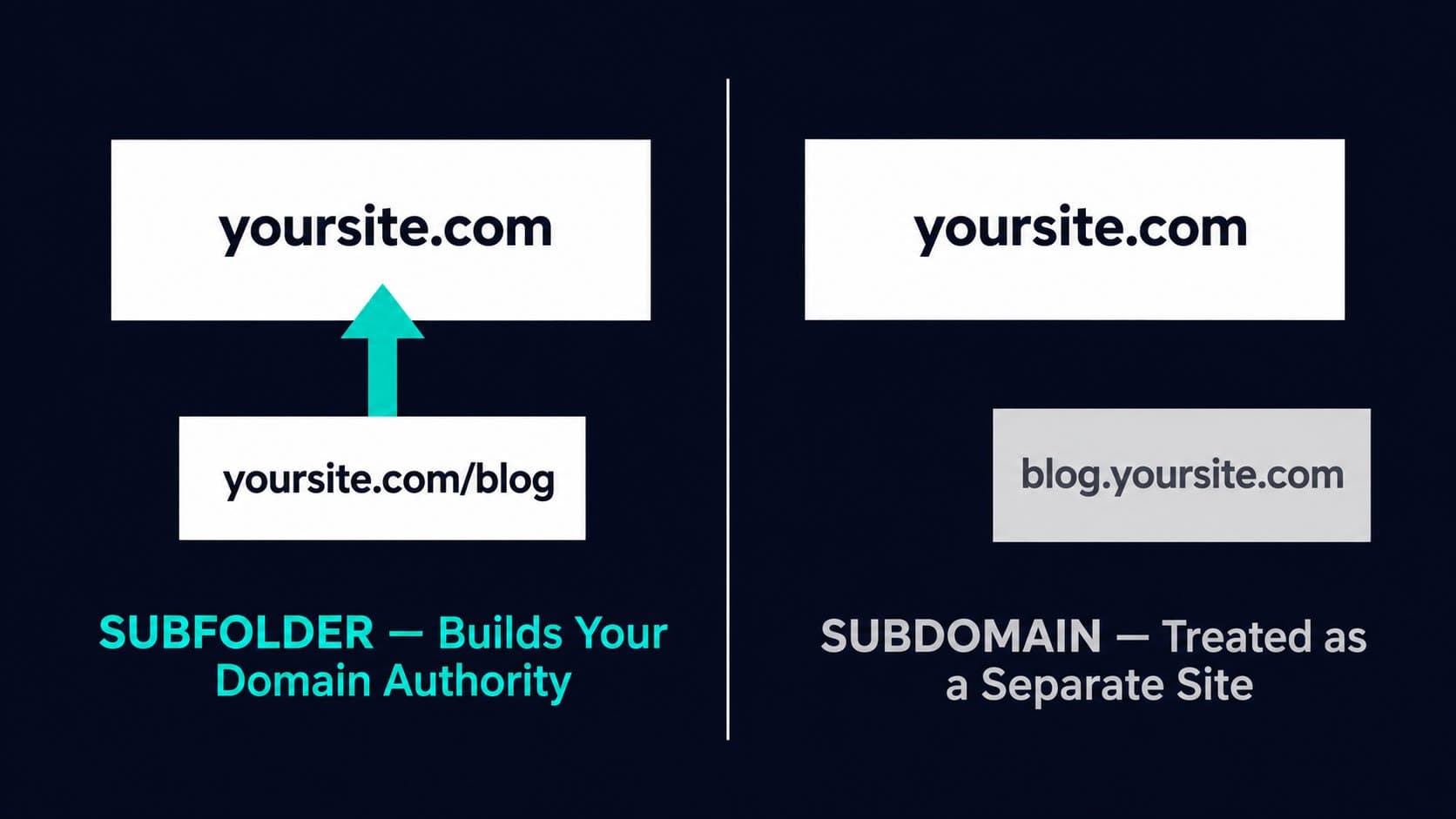
Of the five builders on this list, only Outrank Blogs can be connected natively as a subfolder to an existing site. WordPress.com runs on its own managed stack and cannot be placed inside another site. Wix is your entire website, not a section you add to one. Squarespace is the same. Webflow does not have built-in subdirectory hosting support. Running a Webflow site as a subfolder of a site on another platform requires configuring a reverse proxy on your own server or CDN, which Webflow leaves entirely to you.
That does not mean the others are bad choices. If you are building everything on one of these platforms, the blog lives naturally at yourbrand.com/blog within that platform's own structure. The subfolder question only matters when you already have a site somewhere else and want to add a blog without rebuilding it.
How each builder handles a blog's SEO
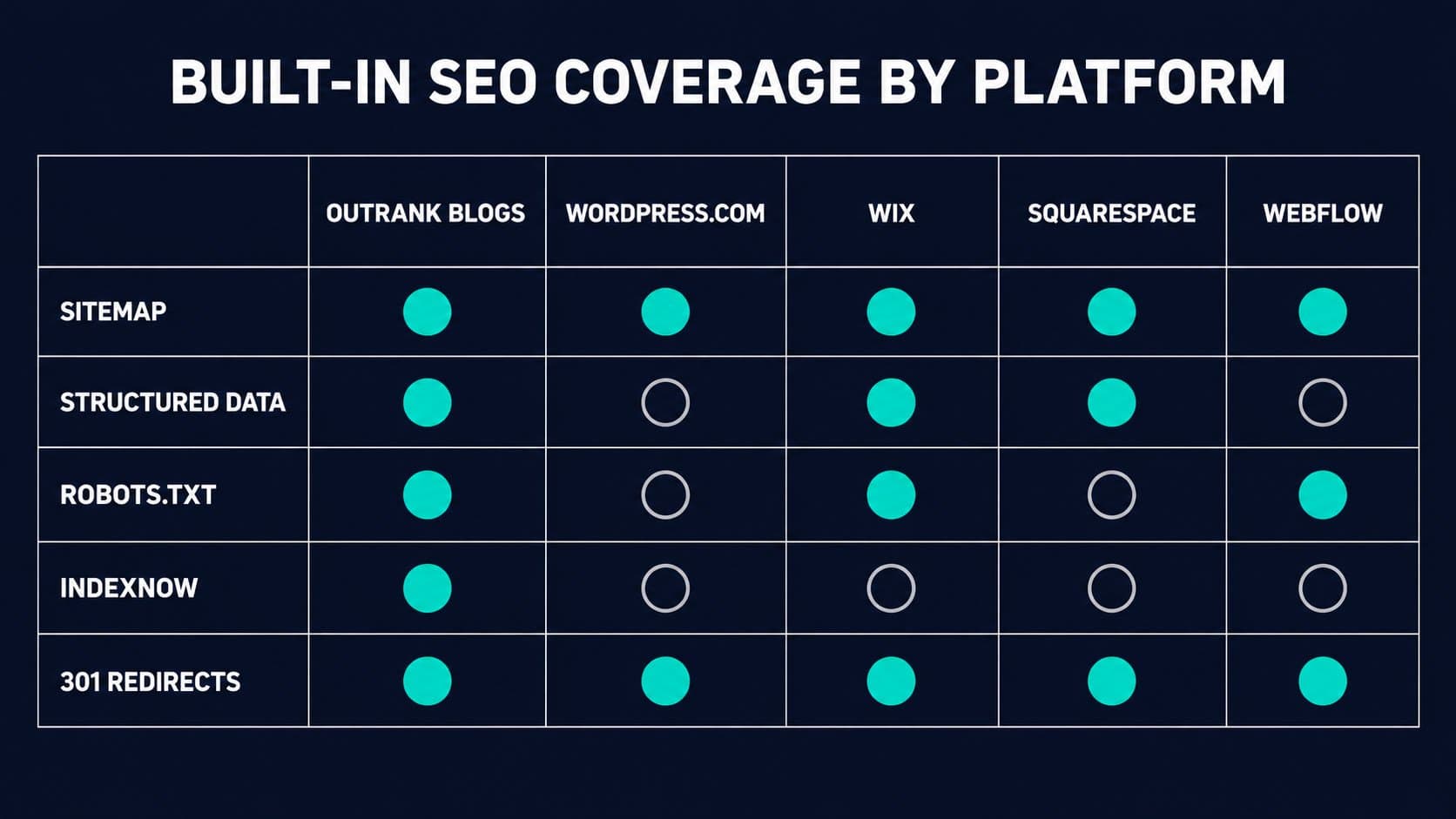
The second thing most comparisons leave vague is what "good SEO" actually means for each platform. Here is what each builder gives you without a plugin or any configuration:
| Platform | Sitemap | Structured data | robots.txt editable | IndexNow | 301 redirects |
|---|---|---|---|---|---|
| Outrank Blogs | Auto, always current | Yes, for articles | Yes | Yes | Yes |
| WordPress.com | Auto (free tier) | Plugin required | Plugin required | No (manual) | Built-in (paid plans) |
| Wix | Auto | Yes (custom structured data fields) | Yes | Paid plans only | Built-in redirect manager |
| Squarespace | Auto, not editable | Auto, not editable | Not editable | No | Built-in (URL mappings) |
| Webflow | Auto or custom | Custom code embed | Yes | No | Built-in, CSV import |
Squarespace is the most locked-down: Google gets what the platform generates, and you cannot override any of it. Webflow and Wix are more configurable but require you to add structured data manually. Outrank Blogs and WordPress.com (on paid plans with a plugin) give you the most coverage by default.
The 5 best website builders for blogs, compared
1. Outrank Blogs: best free builder, best for adding a blog to an existing site
Outrank Blogs is a website builder purpose-built for blogs. You start from one of five templates, pick your layout and brand colors, and use a block-based editor to publish posts. The site it builds includes an XML sitemap, RSS feed, structured data for articles, an llms.txt for AI crawlers, and IndexNow, all wired up without any configuration.
The free plan covers up to 10,000 visits per month with unlimited posts. A "Published with Outrank" badge appears in the footer on the free plan and is removed on the paid plan. If a blog stays over 10,000 visits for two consecutive months, new posts pause until you upgrade, but the site stays live.
Where Outrank Blogs stands apart from every other builder on this list: it can be connected as a subfolder or subdomain of an existing site on Next.js, Vercel, Netlify, Cloudflare, nginx, Webflow, Framer, or Lovable. Your existing site keeps running exactly as it is; the blog appears at yoursite.com/blog through a reverse proxy or rewrite, and every post you publish builds your main domain's authority. Step-by-step setup guides for each framework are linked from the Outrank Blogs page.
The honest trade-offs: the builder is relatively new with five templates and no plugin ecosystem. It handles the blog well, but it does not replace a full website builder if you need an entire site with product pages, forms, and e-commerce on the same platform. For a standalone blog or an add-on blog, it is the clearest choice.
Who it is for: Solopreneurs, businesses, and developers who want a free, SEO-ready blog on their own domain or as a subfolder of their existing site, without managing hosting or configuring plugins.
Pricing: Free up to 10,000 visits/month, unlimited posts. Organic Growth plan: $99/month (30 AI-written SEO articles per month, keyword research, internal linking, backlinks).
2. WordPress.com: best for a blog-first site with long-term flexibility
WordPress.com is the managed hosted version of WordPress, which powers around 40% of all websites globally. The free tier includes the block-based Gutenberg editor and a wordpress.com subdomain, but it shows WordPress.com ads and caps storage at 1 GB. A custom domain and ad removal require the Personal plan ($4/month billed annually).
As a blogging platform, WordPress.com is the most established option on this list. Tags, categories, scheduling, comment management, full RSS, and a large library of themes are all standard. On the Business plan and above, you can install SEO plugins like Yoast and Rank Math, which give you full control over structured data, canonical URLs, and sitemaps. The Personal plan ($4/month) does not include plugin access.
The practical limitation for people who already have a site elsewhere: WordPress.com is a managed hosting environment. You cannot drop it into a subfolder of a site running on Vercel or Webflow. If you want your blog at yoursite.com/blog and your site lives on one of those platforms, WordPress.com is not the path.
Who it is for: Bloggers building a new blog-first site who want maximum long-term flexibility, a large plugin and theme ecosystem, and a familiar writing environment.
Pricing: Free tier available. Personal plan from $4/month billed annually. Custom domain and ad removal require a paid plan.
3. Wix: best all-in-one builder with a blog section
Wix is a general-purpose website builder with strong blogging capabilities. Its drag-and-drop editor covers more design territory than any other builder on this list: more than 900 templates, freeform element placement, AI-generated layouts, and a wide app marketplace. The blogging tools are solid: an editable robots.txt, automatic sitemaps, a redirect manager with CSV import, custom structured data fields, and built-in analytics.
The key limitation for bloggers who have an existing site elsewhere: Wix is your entire site, not a blog you add to another platform. If your homepage runs on Webflow and you want to add a Wix blog at yourhomepage.com/blog, that is not how Wix works. Every part of your site lives in Wix.
On the free plan, your blog sits at a yourname.wixsite.com subdomain with Wix branding. A custom domain requires the Light plan or above (around $17/month billed annually; pricing varies by country).
Who it is for: Solopreneurs, small businesses, and creators who want a single platform covering their homepage, service or product pages, and blog under one login. Not the right choice if the blog is the only thing you are building, or if you need it to live on an existing site.
Pricing: Free plan available (Wix subdomain + branding). Custom domain from approximately $17/month billed annually.
4. Squarespace: best design quality for visual and lifestyle blogs
Squarespace produces the best-looking blogs on this list. Its curated templates and Fluid Engine drag-and-drop editor are the standard for photographers, designers, and lifestyle bloggers where the visual experience is as important as the content. No other builder here makes a new blog look this good this fast.
The SEO limitation is real and documented. On Squarespace, you cannot edit the robots.txt file, the XML sitemap, or the structured data output. Google receives what the platform generates automatically, and you cannot override or extend it. For most personal and lifestyle blogs, that is sufficient. For anyone who wants to tune structured data, add custom schema, or control crawl behavior as the site grows, Squarespace will eventually become a ceiling.
There is no free plan. The cheapest paid tier starts at $16/month billed annually with a 14-day free trial. Like Wix, Squarespace is your whole site: you cannot add it as a blog subfolder on a site hosted elsewhere.
Who it is for: Design-forward bloggers in photography, food, travel, fashion, and other visual categories where how the content looks is a central part of the brand. Not the right pick for anyone prioritizing granular SEO control.
Pricing: From $16/month billed annually. No free plan. 14-day free trial available.
5. Webflow: best for design-led sites where the blog is built for developers
Webflow is a visual development platform that produces clean, hand-coded HTML. For design-led marketing sites where the team includes a designer or developer, Webflow has no equal on this list: full design freedom, clean semantic output, an editable robots.txt, automatic sitemaps, canonical settings, and bulk 301 redirects.
Adding a blog in Webflow uses its CMS Collections feature. You design the post template visually and Webflow generates each post from the collection. The Premium plan is required for this, at $25/month billed annually (verify current pricing at webflow.com/pricing before signing up, as Webflow has restructured its plans).
The subfolder limitation: Webflow sites run on a root domain or subdomain. There is no Webflow-managed option for running your Webflow blog as a subfolder of a site hosted on another platform. You would need to configure a reverse proxy yourself on your own server or CDN. For most teams, this is not a practical path. Structured data also requires a custom code embed rather than being generated automatically.
Who it is for: Designers and developers building a full site in Webflow who want the blog to live within that same environment. Not practical as a standalone blog or as a blog addon to a site hosted on a different platform.
Pricing: Basic plan from $15/month billed annually (no CMS). Premium plan $25/month billed annually (CMS included, required for a dynamic blog). Verify current pricing at webflow.com/pricing before signing up, as Webflow has restructured its plans.
Which builder is right for your situation?
| Your situation | Best pick |
|---|---|
| Starting a new blog-first site, want SEO built in, free to start | Outrank Blogs |
| Already have a site on Vercel, Netlify, Webflow, Framer, or similar; want to add a blog at yoursite.com/blog | Outrank Blogs |
| Building a complete new site with a blog section, drag-and-drop ease | Wix |
| Design is the top priority, visual or lifestyle blog | Squarespace |
| Blog-first site, want maximum long-term control and plugin ecosystem | WordPress.com |
| Full site designed in Webflow, blog stays within the same environment | Webflow |
Why trust this comparison
We at Outrank built Outrank Blogs, so we are one of the platforms on this list. We have tried to represent each builder's real limitations honestly: Squarespace locks down SEO controls; Webflow has no managed subfolder hosting and requires you to configure a reverse proxy yourself; Wix cannot add a blog to a site hosted on another platform. Where a competitor genuinely fits a situation better than Outrank Blogs, we have said so.
Each platform was evaluated on five criteria: how the blog's address is structured and what that means for SEO; what SEO features ship without any additional plugin or configuration; whether the blog can run as a subfolder of an existing site on another platform; design quality; and what the realistic cost is once you need a custom domain. Pricing was verified against current platform pages at the time of writing and should be re-checked before publishing.
Adding a blog to your existing site with Outrank Blogs
If your site already runs on a framework and you do not want to rebuild it, Outrank Blogs is the only builder on this list that connects as a native subfolder or subdomain without a reverse proxy setup on your side. The blog is live in under a minute. Connecting it to your domain is free. Sitemap, structured data, RSS, and IndexNow work from the first post.
The free plan covers up to 10,000 visits per month with unlimited posts. When you are ready to produce consistent SEO content at scale, the Organic Growth plan ($99/month) adds 30 AI-written articles per month with keyword research, internal linking, and backlinks.
Frequently Asked Questions
Which website builder is best for a blog?
The best website builder for a blog depends on whether you are starting from scratch or adding to an existing site. For a new standalone blog with SEO built in from day one at no cost, Outrank Blogs is the most direct option. For a full website with a blog section, Wix gives you the most design flexibility and Squarespace gives you the best templates. For maximum long-term control and a plugin ecosystem, WordPress.com is the established choice.
Can I add a blog to my existing Webflow, Framer, or Vercel site without rebuilding it?
Yes, using Outrank Blogs. It connects as a subfolder (yoursite.com/blog) or subdomain (blog.yoursite.com) through a reverse proxy or rewrite rule on your existing host. Your main site keeps running as it is and the blog posts build your main domain's authority. Step-by-step setup guides are linked from the Outrank Blogs page. Webflow can host its own CMS blog internally, but there is no managed Webflow option for running it as a subfolder of a site hosted on a different platform. That requires a self-configured reverse proxy on your own server or CDN.
Is Wix or Squarespace better for a blog?
Wix is better if you want a complete website with a blog and prioritize ease of use and flexibility. Squarespace is better if design quality is the priority, especially for photography, food, lifestyle, and visual content. Neither is a good choice if you need granular SEO control: Squarespace locks down its sitemap and structured data entirely, and Wix, while more configurable, does not support running the blog as a subfolder of a site hosted elsewhere.
What is the best free website builder for a blog?
The strongest free option for a blog with real SEO features is Outrank Blogs: free up to 10,000 visits per month, custom domain connection at no cost, and sitemap, structured data, and IndexNow included without any setup. Wix has a free plan but requires a paid upgrade for a custom domain and removes Wix branding. WordPress.com has a free tier but shows platform ads and requires a paid plan for a custom domain.
Does it matter whether my blog is on a subfolder or a subdomain?
It matters, though the degree to which it matters is debated. Most SEO practitioners recommend a subfolder (yoursite.com/blog) over a subdomain (blog.yoursite.com) because Google treats a subfolder as part of your main site, meaning posts contribute directly to your main domain's authority. A subdomain is treated more like a separate site in Google's crawl. If your blog is your whole site, this question does not apply. If you are adding a blog to an existing site, it is worth setting up the subfolder correctly from the start rather than migrating later.