


The fastest way to add a blog to your website depends on how the site is built. If you're on Wix, Squarespace, or Webflow, the native blog feature is already there. If you're on a custom stack, a hosted subdirectory platform is cleaner. If neither applies, an embedded widget fills the gap.
Here's the longer version, because picking the wrong method means your blog's traffic doesn't actually compound with your main domain.
What Every Blog Setup Needs to Get Right
Before picking a method, it's worth knowing what a blog setup actually needs to do. The technical requirements are simple, but most people don't check until it's too late.
A well-configured blog should:
Live on a subdirectory, not a subdomain (more on this below)
Generate a sitemap automatically and submit it to Google
Include structured data (specifically,
Articleschema markup) so search engines understand the content typeSupport RSS for readers who subscribe via feed readers or newsletter tools
Allow a custom domain so your blog lives at yourdomain.com/blog, not at yourbrand.blogtool.com
Render server-side, not purely via client-side JavaScript, so crawlers can index the content reliably
Most site builders handle the first four reasonably well. The last two are where things diverge, and they're the ones that actually matter once you start publishing consistently.
Three Methods, Side by Side
| Method | Works With | SEO Authority | Setup Time |
|---|---|---|---|
| Native site builder blog | Wix, Squarespace, Webflow, Shopify | Stays on your domain | 15–30 min |
| Hosted subdirectory blog | Any site type | Stays on your domain | 30–60 min |
| Embedded blog widget | Most builders and frameworks | Depends on implementation | 1–2 hours |
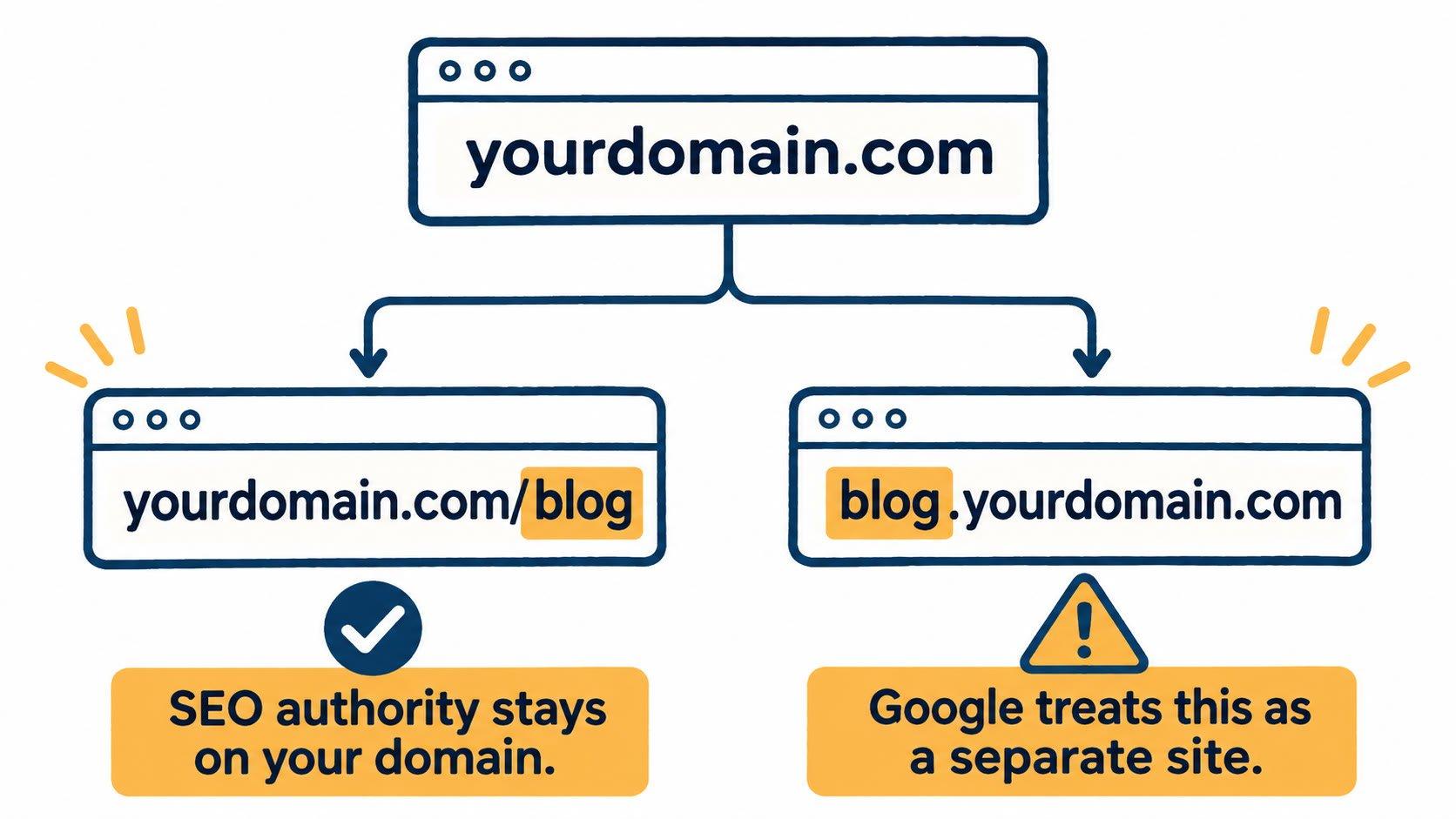
One thing worth understanding before you pick: a blog at yourdomain.com/blog passes ranking signals back to your main domain. A blog at blog.yourdomain.com (a subdomain) is treated by Google as a separate site, so those signals don't compound. Keep the blog on a subdirectory unless you have a specific reason not to.
Method 1: Your Site Builder's Native Blog
If you're on Wix, Squarespace, Webflow, or Shopify, there's a built-in blog feature already waiting.
Where to find it:
Wix: Dashboard → Add Apps → Wix Blog
Squarespace: Pages → Add Page → Blog
Webflow: CMS Collections → create a "Posts" collection
Shopify: Online Store → Blog Posts
Native blogs are the fastest setup. No third-party accounts, no extra tools. Posts automatically live at yourdomain.com/blog, which is where you want them for SEO.
What each platform actually gives you
The native experience varies quite a bit depending on which builder you're on.
Wix has a solid native blog. You get categories, tags, SEO meta fields, and the ability to schedule posts. Structured data for articles is generated automatically. The main limitation is design flexibility: you're working within Wix's existing templates, so advanced customization requires either Wix Studio or a developer.
Squarespace is probably the most polished native blog experience, visually. The editor is clean, the layouts look good out of the box, and basic SEO settings (title, description, slug) are all accessible. What's missing: IndexNow support and granular control over structured data. If you need fine-tuned schema markup, you'll need to inject it manually in the page header.
Webflow is the most powerful option here, but also the most work to set up. You build a CMS Collection for posts, design a template for how posts render, and create the blog index page yourself. The upside: total flexibility, custom fields, and the ability to add structured data via custom embeds. The downside: this is not a 15-minute setup if you're starting from scratch. Budget an afternoon, not a coffee break.
Shopify treats blogging as a secondary feature. The editor is basic, there are no categories (only tags), and SEO control is limited. If you're running a Shopify store and want a serious content program, a hosted subdirectory platform will serve you better than what Shopify ships natively.
Pick this if: You want the simplest setup, you're not on Shopify, and you're not planning a large-scale content program anytime soon.
Method 2: A Hosted Blog on a Subdirectory
This is the most flexible option, and it works regardless of what your main site is built on.
The setup: a third-party blog platform hosts your content and serves it at yourdomain.com/blog through a subdirectory configuration. Your existing site stays completely untouched. The blog runs alongside it on the same domain.
How subdirectory hosting actually works
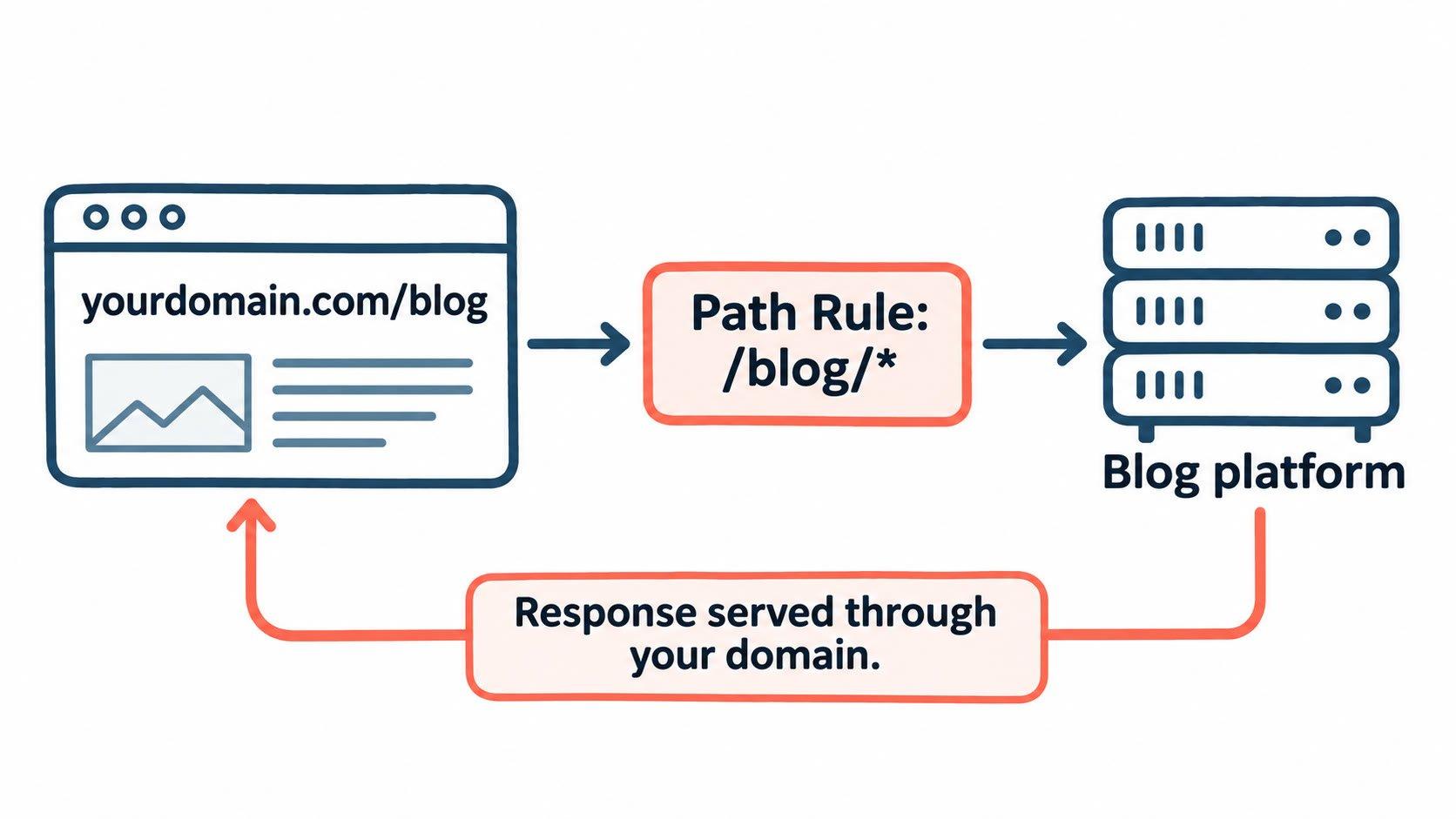
When you configure a hosted blog on a subdirectory, you're setting up a path routing rule: any request to yourdomain.com/blog/* gets forwarded to the blog platform, which serves the response back through your domain. The person visiting your site never knows the blog is running on a separate platform. From Google's perspective, everything lives on one domain.
The configuration depends on your hosting setup:
Vercel / Netlify: add a rewrite or proxy rule in your config file that forwards /blog/* to the blog platform's URL
Cloudflare: use a Page Rule or Worker to proxy requests on the /blog path
Custom nginx: add a location block forwarding /blog to the upstream blog service
Webflow or Framer: use a reverse proxy layer, which the platform's own setup guide covers step by step
This is how Outrank Blogs works. You sign up, choose a template, connect your domain under a /blog subdirectory, and start publishing. Everything runs on your main domain automatically: sitemap, structured data, IndexNow pings, and RSS. The free plan covers up to 10,000 visits/month with unlimited posts.
What to look for in any hosted subdirectory blog:
Serves content on a true subdirectory path, not a subdomain
Auto-generates a sitemap and submits it to search engines
Supports connecting your own domain (not just a branded subdomain)
Includes structured data and RSS by default
Doesn't require a developer to maintain once configured
For custom stacks like Next.js, Vercel, Cloudflare, or Webflow, we have step-by-step setup guides:
Pick this if: You want a proper SEO-ready blog without touching your existing site's code, and you're open to using a dedicated blogging platform for the content side.
Method 3: An Embedded Blog Widget
Tools like DropInBlog and Hyvor Blog let you embed a full blog with a single code snippet. You paste it into an existing page, and the blog renders inside your site's layout.
For certain setups, this is genuinely the cleanest option. For others, it creates problems that take weeks to notice.
Where embedded widgets work well
Static HTML sites, or platforms where you can drop in a custom HTML block. If you're on a simple site builder that doesn't have its own blog and can't route subdirectory traffic, an embed is often your only option that doesn't require rebuilding anything.
DropInBlog, specifically, renders content server-side before it reaches your page, which means crawlers see the full content without needing to execute JavaScript first. That's the exception, not the rule. Most widget-based embeds don't work this way.
Where embedded widgets create problems
The SEO issue comes down to how the content is rendered. Most embedded blog tools use client-side JavaScript to load blog content after the page loads. The page structure is there when a crawler arrives, but the actual post content loads a few hundred milliseconds later. Some crawlers miss it entirely.
The symptoms show up in Google Search Console: you'll see pages listed as "Crawled - currently not indexed" or the indexed version will show just your page shell, with no actual post content. By the time you notice, you may have published 20 posts that Google hasn't seen.
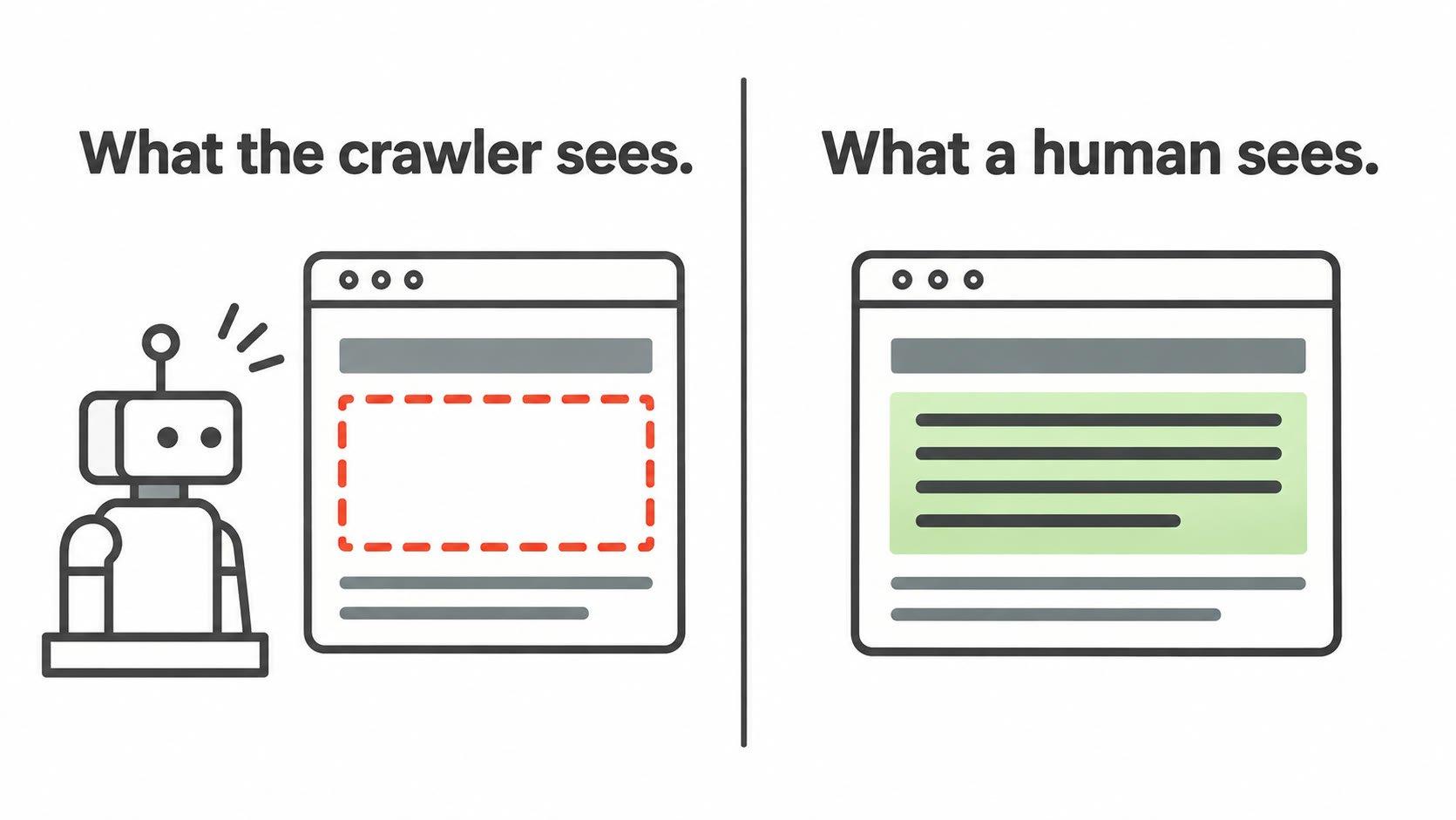
If you go this route, verify indexing within the first week. Use Google's URL Inspection tool on a live post URL and check whether the rendered HTML actually includes your blog content. If it shows a blank container where your posts should be, you have a rendering problem worth diagnosing before it compounds.
Pick this if: Your site can't support a subdirectory setup, your builder doesn't have a native blog, and you verify that your posts are being indexed right after launch.
Common Mistakes Worth Avoiding
A few things that trip people up regardless of which method they choose.
Setting up a subdomain by mistake. A lot of platforms default to blog.yourdomain.com because it's the simplest DNS configuration. It works, the blog functions fine, everything looks correct in the browser. The problem only surfaces when you check Google Search Console weeks later and notice the blog's traffic isn't lifting your main domain at all. Always verify the URL structure before you publish your first post.
Not submitting a sitemap. A blog platform that generates a sitemap is only half the job. You also need to submit that sitemap URL to Google Search Console. It's a 30-second step (Sitemap section → paste the URL → submit), and skipping it means Google finds your posts on its own schedule instead of yours. Some platforms like Outrank Blogs handle this automatically via IndexNow; others leave the submission to you.
Publishing without checking indexing. After your first few posts go live, check that Google is actually indexing them. Open Search Console, go to URL Inspection, paste a post URL, and look at the "Coverage" and "Indexability" fields. If posts are showing as "Discovered - currently not indexed" or "Crawled - currently not indexed," there's a problem worth diagnosing before you write 30 more posts.
Choosing an embed on a JavaScript-heavy site. If your main site is already a React or Next.js app that renders entirely client-side, adding a JavaScript-based embed creates a compounding problem. The page itself is dynamic, and then the blog content on top of it is also dynamically loaded. This is solvable with server-side rendering or a blog platform that pre-renders content before delivering it, but it's not something most embedded widget tools handle automatically.
How to Choose
A simple decision framework:
On Wix, Squarespace, or Webflow? Use the native blog. It's already there, it's well-integrated, and it won't create any subdomain problems.
On Shopify? Skip the native blog and use a hosted subdirectory platform. Shopify's native blogging is too limited for a real content program.
On a custom framework (Next.js, Gatsby, Nuxt, plain HTML)? Use a hosted subdirectory blog. It's the cleanest solution with the least disruption to your existing code.
On a site builder that can't route subdirectory traffic? Use an embedded widget, but verify indexing immediately after launch.
On Framer or Lovable? Both work best with a subdomain setup (blog.yourdomain.com). Our Framer guide and Lovable guide cover the setup steps, including the subfolder option where available.
When in doubt, the hosted subdirectory option works independently of whatever your main site is built on. It's the safest fallback for unusual setups, and it gives you the most room to grow as your content program expands.
Why Trust This Article
We compared each method against three criteria: how much SEO authority stays on your main domain, how much setup work is realistically involved, and whether a non-developer can complete the setup without touching their existing site's code. The recommendations reflect how these setups behave in practice, not how platforms describe themselves. We've seen the subdomain mistake specifically cause real traffic attribution problems, which is why the subdirectory point comes up more than once.
Start With a Free Blog That's Already SEO-Ready
If you want to skip the setup complexity, Outrank Blogs connects to your existing domain as a subdirectory blog. The free plan covers up to 10,000 visits/month with unlimited posts. Sitemap, structured data, IndexNow, and RSS come standard, with no configuration needed.
Pick a template, connect your domain under a /blog subdirectory, and your first post can be live in under an hour. IndexNow fires automatically on every publish, so Bing and other participating search engines are notified the same day new content goes up. No manual sitemap submissions required.
The editor is block-based: text, images, embeds, and code blocks without touching HTML. Everything renders server-side, so there are no crawl or indexing surprises after publishing.
Not ready to connect a domain yet? You get a free outrankblog.com subdomain to start immediately and migrate to your own domain later. Post content and URL slugs transfer cleanly when you make the switch.
If you want to compare options before committing, our best free blogging platforms roundup covers the full field, and the alternatives hub breaks down how each one handles domain setup and SEO. And when you're ready to scale beyond what you can write yourself, the Organic Growth plan ($99/month) adds 30 AI-written SEO articles per month, automatic internal linking and images, and backlinks from sites in the Outrank network.
Frequently Asked Questions
Can I add a blog to my website without WordPress?
Yes. WordPress is one option, not the only one. Site builders like Wix and Squarespace have built-in blog features. Hosted subdirectory platforms like Outrank Blogs add a blog to any existing site without installing WordPress at all. The right choice depends on what your site is currently built on, not on a default assumption that every blog needs WordPress behind it.
Should my blog be on a subdomain or subdirectory?
A subdirectory (yourdomain.com/blog) is better for SEO in most cases. Google generally treats a subdomain (blog.yourdomain.com) as a separate site, so your blog's ranking signals don't compound with your main domain. Unless you have a specific technical reason for a subdomain, such as a completely different tech stack that can't be proxied, keep the blog on a subdirectory.
How long does it take to add a blog to an existing website?
Between 15 minutes and two hours, depending on the method. A site builder's native blog takes 15–30 minutes. A hosted subdirectory platform takes 30–60 minutes, a bit longer if you need to configure domain routing via DNS or a proxy. An embedded widget can take 1–2 hours if you run into rendering or indexing issues that need diagnosing.
Will adding a blog slow down my existing website?
If you use a hosted subdirectory platform (Method 2), no. The blog runs on separate infrastructure and adds no load to your main site. Only the blog pages load from the platform; your homepage, product pages, and everything else stay on your existing host unchanged. If you use an embedded widget, performance depends on how that widget loads; a heavy JavaScript embed can add noticeable page weight to whatever page hosts it.
Do I need a developer to add a blog to my website?
Not for most setups. Site builder native blogs and hosted subdirectory platforms are both designed for non-developers. The exception: if your site is on a custom framework and you need to configure subdirectory routing (a Vercel rewrite rule, an nginx location block, or a Cloudflare Worker), that may require 30–60 minutes of dev work. For most frameworks, the config change is a few lines.
What's the best free option for adding a blog to an existing site?
For most setups, a hosted subdirectory platform is the best free starting point. Outrank Blogs' free plan covers up to 10,000 visits/month with unlimited posts and includes sitemap, structured data, IndexNow, and RSS by default. If you're on Wix or Squarespace, the native blog is effectively free on the paid builder plans you're already on. The worst free option is usually a fully separate hosted blog on a different domain — posts on medium.com or substack.com build authority for those domains, not yours.
Can I move my blog to a different platform later?
Yes, but it requires planning. If you move your blog and your URLs change (for example, from /blog/post-title to /posts/post-title), you need 301 redirects from the old URLs to the new ones, or you'll lose the rankings those posts had earned. If you stay on the same subdirectory path and keep the same slug structure, most of your rankings survive the platform switch intact. Before switching, audit your existing post URLs and confirm the new platform can serve content on the same paths, or will redirect from the old ones automatically.