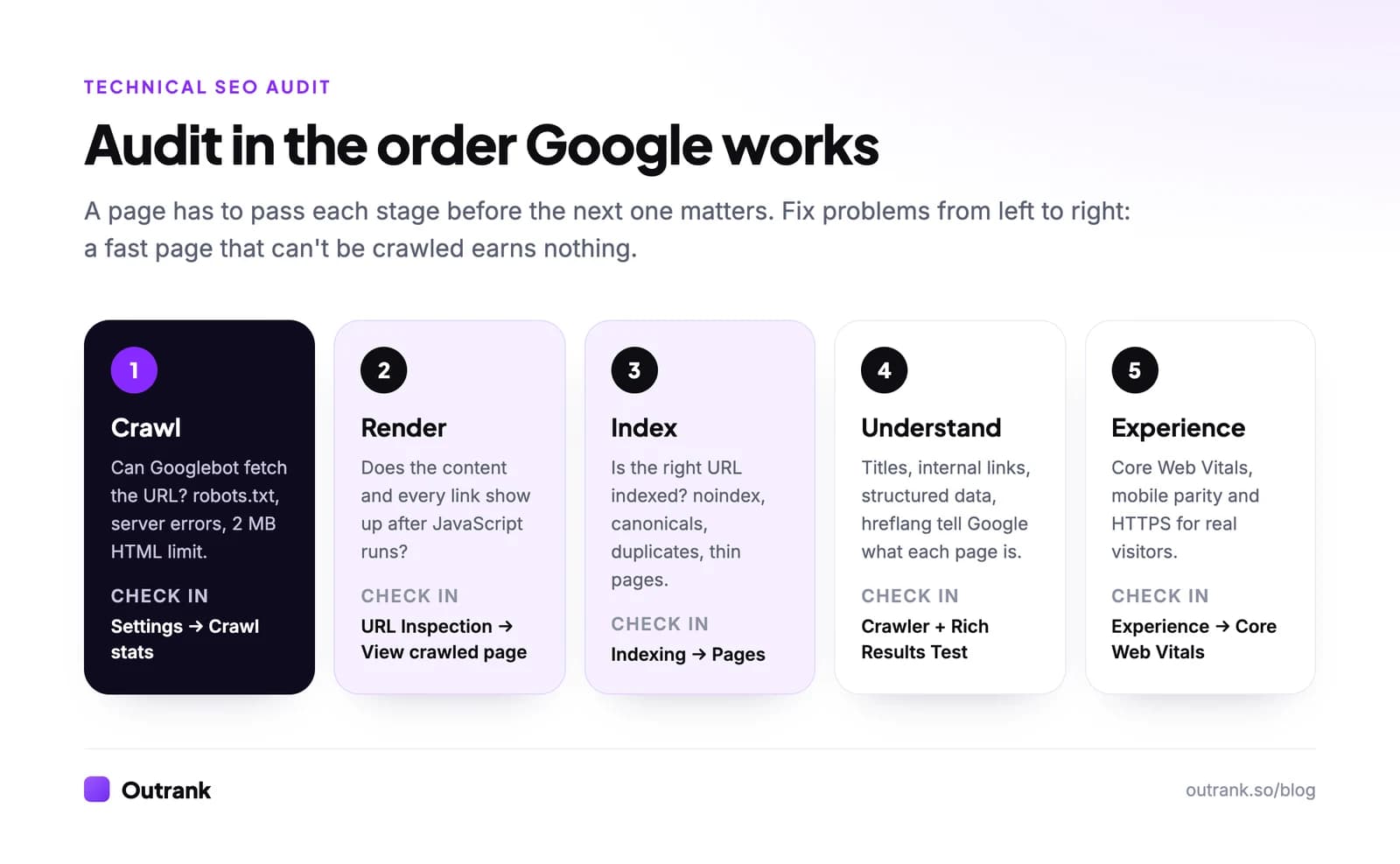
A technical SEO audit checklist is the list of checks that prove search engines can crawl, render and index your pages, and that those pages load fast and securely for visitors. Work through it in the order Google processes a page: crawling (robots.txt, server errors), rendering (JavaScript), indexing (noindex, canonicals, sitemaps), understanding (internal links, structured data) and experience (Core Web Vitals, mobile, HTTPS).
Below are 40 checks you can tick off as you go. Each one names the exact report to open and what "passing" looks like, so you are not guessing whether a number is good.
Key takeaways
- Audit in Google's own order: crawl, render, index, then speed. A fast page that is blocked in robots.txt earns nothing.
- Since February 2026, Google's documentation says Googlebot reads only the first 2 MB of an HTML file (uncompressed). Content past that point is invisible to Search.
- Core Web Vitals pass when the 75th percentile of real visits hits LCP ≤ 2.5 s, INP ≤ 200 ms and CLS ≤ 0.1.
- You can run the whole audit for free with Search Console, PageSpeed Insights, the Rich Results Test and a crawler (Screaming Frog's free tier crawls 500 URLs).
- FAQ rich results stopped showing in Google on May 7, 2026. FAQ markup is still valid, but it no longer earns extra space in the results.
What a technical SEO audit covers (and what it doesn't)
A technical SEO audit checks the infrastructure under your content: whether Googlebot can reach a URL, see what's on it, pick the right version to index and serve it quickly. It does not judge whether the content is good, whether your keywords are right or how many backlinks you have.
That split matters because the fixes go to different people. Technical findings usually land with a developer; content and link findings land with marketing. If you need the broader review (content, UX, conversion, tracking, legal pages), use our website auditing checklist. If you want the step-by-step process for a full SEO audit, including how to audit a site you don't own, read how to do a website audit. This page is the technical layer only, written to be ticked off.
The tools you need (mostly free)
You can do a thorough technical audit without paying for anything. Paid crawlers save time on large sites, but they read the same signals.
| Tool | What you use it for | Cost (October 2026) |
|---|---|---|
| Google Search Console | Indexing status, crawl stats, Core Web Vitals field data, HTTPS report, URL Inspection | Free |
| Screaming Frog SEO Spider | Crawls your site like a bot: status codes, redirects, canonicals, titles, crawl depth | Free up to 500 URLs; $279 per licence per year |
| Ahrefs Free (formerly Ahrefs Webmaster Tools) | Site Audit with 170+ checks on sites you verify | Free, 5,000 crawl credits per project per month |
| PageSpeed Insights | Field data (Chrome UX Report) and lab diagnostics for one URL | Free |
| Rich Results Test | Validates structured data and shows the rendered HTML | Free |
| Bing Webmaster Tools | A second opinion on crawl errors, plus IndexNow | Free |
If you have never verified your site in Search Console, do that first. Use a Domain property: it covers every subdomain and both http and https.
The technical SEO audit checklist
Tick items as you check them. Progress is saved in your browser, so you can come back to it.
Interactive checklist
Technical SEO audit checklist (40 checks)
0/40
Crawling
0/6Indexing
0/7Rendering and JavaScript
0/4Status codes and redirects
0/5Speed and Core Web Vitals
0/5Mobile
0/2Site structure and internal links
0/5Structured data
0/2HTTPS and security
0/2International and AI crawlers
0/2Your progress is saved in this browser, so you can come back to it later.
How to check each group, with the details that trip people up
Crawling: robots.txt, server health and the 2 MB limit
Start in Search Console → Settings → Crawl stats. The Host status panel tells you whether Google had trouble fetching robots.txt, resolving DNS or connecting to your server in the last 90 days. A red status here outranks every other finding in the audit.
Then read your robots.txt line by line. The classic disasters are a Disallow: / left over from a staging launch and a rule that blocks the folder holding your CSS and JavaScript. Google's robots.txt documentation also caps the file at 500 KiB and ignores rules beyond it.
One limit changed recently. Google's Googlebot documentation, updated in February 2026, says Googlebot crawls the first 2 MB of a supported file type and the first 64 MB of a PDF, measured on uncompressed data. Most pages are far below that, but page builders that inline megabytes of JSON or base64 images can push the main content past the cutoff.
Indexing: the Pages report is the heart of the audit
Indexing → Pages splits every known URL into indexed and not indexed, with a reason for each excluded URL. Compare the indexed count with the number of pages you actually want in Google. A site with 300 real pages and 4,000 indexed URLs has a parameter or duplication problem; a site with 300 pages and 90 indexed has a quality or discovery problem.
The reasons you will see most often:
| Reason in Search Console | What it usually means | Typical fix |
|---|---|---|
| Excluded by 'noindex' tag | A template or plugin setting adds noindex | Remove it from pages you want indexed |
| Alternate page with proper canonical tag | Working as intended (variants pointing to a main URL) | Nothing, unless the main URL is wrong |
| Duplicate without user-selected canonical | Google found near-identical pages and picked one | Add canonicals or consolidate the pages |
| Crawled - currently not indexed | Google fetched the page and chose not to index it | Improve or merge the content; see our fix guide |
| Discovered - currently not indexed | Google knows the URL but hasn't crawled it yet | Internal links from strong pages, sitemap, server capacity |
| Soft 404 | The page returns 200 but looks empty or "not found" | Return a real 404 or 410, or add real content |
Your XML sitemap should be the clean list of URLs you want indexed and nothing else. Google ignores the priority and changefreq fields and only uses lastmod when it is consistently accurate, per its sitemap guidelines. If you have never built one, here is how to make a sitemap.
Rendering: what Google sees after JavaScript runs
Google crawls the raw HTML, renders the page with JavaScript later, then indexes the rendered result. If your framework builds the content in the browser, the only proof that Google sees it is the rendered HTML in URL Inspection → Test live URL → View tested page. Search that HTML for a sentence from the middle of your page and for links to your key pages.
Two problems show up again and again on React and Vue marketing sites: navigation built with buttons and onclick handlers instead of <a href>, and a canonical or noindex that JavaScript changes after load. Both are invisible in a browser and obvious in the rendered HTML. SaaS sites hit these constantly, which is why our technical SEO for SaaS guide treats rendering as its own chapter.
Status codes and redirects
Run a crawler and sort by status code. Every internal link should point straight at a URL that returns 200. Links to redirects waste a hop; links to 404s waste the link. Our guide on how to fix broken links covers the clean-up, including which dead URLs deserve a redirect.
Redirects should be one hop, 301 (or 308) for permanent moves. Google says it follows up to 10 redirect hops before reporting an error, so chains rarely break indexing outright, but they slow crawling and add latency for every visitor.
Speed and Core Web Vitals
Use field data, not a single lab score. Experience → Core Web Vitals in Search Console groups URLs by template and reports real-user data from the Chrome UX Report. Google's thresholds, measured at the 75th percentile of visits:
| Metric | Measures | Good | Poor |
|---|---|---|---|
| Largest Contentful Paint (LCP) | Loading of the main content | ≤ 2.5 s | > 4.0 s |
| Interaction to Next Paint (INP) | Responsiveness to clicks and taps | ≤ 200 ms | > 500 ms |
| Cumulative Layout Shift (CLS) | Visual stability | ≤ 0.1 | > 0.25 |
INP replaced First Input Delay as a Core Web Vital in March 2024, so any checklist still mentioning FID is out of date. Google's Core Web Vitals documentation is clear that good scores help but don't override relevance. Fix the templates that carry most of your traffic first.
Mobile, structure and structured data
Google crawls and indexes the mobile version of every site, so the mobile check is a parity check: same main content, same internal links, same structured data and meta tags as desktop. The old Mobile-Friendly Test was retired in December 2023; Lighthouse in Chrome DevTools covers the same ground.
For structure, export crawl depth and inlinks from your crawler. Pages more than three or four clicks from the homepage and pages with zero internal links are the ones Google discovers late and values least. Our guide on how to find internal links to a page shows how to check a single URL. If you publish with Outrank, each new article goes out with internal links to related posts on your site, which keeps a growing blog from piling up orphan pages.
For structured data, validate a sample of each template in the Rich Results Test, then check the Enhancements reports for errors across the whole site. Keep expectations current: Google has been retiring rich result types, and according to its Search Central changelog, FAQ rich results stopped appearing on May 7, 2026. FAQ markup is still valid for describing a page; it just no longer earns the expandable snippet.
HTTPS, hreflang and AI crawlers
The Experience → HTTPS report lists URLs that failed to load over HTTPS. Pair it with a crawler search for http:// resources on HTTPS pages (mixed content). What an SSL certificate does and doesn't fix for SEO is covered in this explainer.
If you run several languages, every hreflang set must be reciprocal (page A points to B and B points back), include a self-reference and ideally an x-default.
Last, decide on AI crawlers on purpose. OpenAI's crawler documentation separates OAI-SearchBot (which surfaces sites in ChatGPT search) from GPTBot (which collects training data). Blocking the first removes you from ChatGPT's search answers; blocking the second only opts you out of training. Google-Extended controls Gemini training and grounding in Gemini apps but does not affect Google Search; more in what is Google-Extended.
How to prioritize what you find
A typical first audit produces hundreds of "issues". Most are noise. Sort findings by how many important pages they affect and how close they sit to the start of the pipeline:
| Priority | Examples | When to fix |
|---|---|---|
| Critical | Site-wide noindex, Disallow: /, 5xx errors, expired certificate, canonicals pointing at another domain, staging site indexed | Today |
| High | Key templates excluded from the index, internal links to 404s on money pages, failing Core Web Vitals on high-traffic templates | This sprint |
| Medium | Redirect chains, orphan pages, duplicate titles, hreflang errors | This quarter |
| Low | Missing alt text on decorative images, structured data warnings (not errors), long URLs | When convenient |
Re-check each fix in Search Console with Validate fix on the relevant Pages or Core Web Vitals issue. Validation can take a couple of weeks, so log the date you clicked it.
How often to run a technical SEO audit
Run the full checklist once a quarter, and always before and after a migration, redesign, CMS change or domain move. In between, a 10-minute weekly look at Indexing → Pages and Crawl stats catches most regressions early. If you'd rather hand the job to a specialist, here is what technical SEO services include and cost.
FAQ
What is a technical SEO audit?
A technical SEO audit is a review of how well search engines can crawl, render, index and understand your website, plus how quickly and securely it loads. It checks robots.txt, status codes, canonicals, sitemaps, JavaScript rendering, Core Web Vitals, mobile parity, structured data and HTTPS. It does not assess content quality or backlinks.
What should a technical SEO checklist include?
At minimum: robots.txt and crawl errors, the Search Console Pages report, canonical tags, XML sitemaps, rendered HTML, status codes and redirects, Core Web Vitals, mobile parity, internal linking and orphan pages, structured data validation, and HTTPS. International sites add hreflang, and most sites should now set deliberate rules for AI crawlers.
How long does a technical SEO audit take?
For a site under a few hundred pages, a focused audit with free tools takes half a day to a day. Large ecommerce or SaaS sites with faceted navigation, JavaScript rendering or several languages can take one to three weeks, mostly spent crawling, sampling templates and writing up fixes.
Can I do a technical SEO audit for free?
Yes. Google Search Console, PageSpeed Insights, the Rich Results Test and Bing Webmaster Tools are free, Ahrefs Free audits sites you verify, and Screaming Frog crawls up to 500 URLs without a licence. Paid tools mainly save time on bigger sites and add scheduling and reporting.
How often should you do a technical SEO audit?
Run a full audit every quarter and before and after any migration, redesign or CMS change. Check Search Console's Pages and Crawl stats reports weekly so a broken robots.txt or a noindex pushed by a plugin is caught in days, not months.