Google-Extended is a robots.txt token that tells Google whether the content it crawls from your site may be used to train future Gemini models and to ground answers in the Gemini app and Vertex AI. It isn't a separate crawler: Googlebot still fetches your pages, and the token only controls what Google may do with them. According to Google's crawler documentation, it doesn't affect your inclusion or ranking in Google Search, and AI Overviews and AI Mode are part of Search, so blocking it doesn't remove you from those either.
Below: exactly what it controls, how to check your own robots.txt in ten seconds, how Figma and Zapier made opposite choices, and how it compares with every other AI crawler token.
Key takeaways
- Google-Extended controls two things: training future Gemini models, and grounding answers in the Gemini app and Vertex AI. It does not affect Google Search rankings, AI Overviews or AI Mode.
- There's no Google-Extended user agent in your logs. Googlebot does the crawling; the token is only a usage rule.
- The only way to keep content out of AI Overviews is a Search control such as nosnippet or noindex, which also hits your normal search results.
- Figma blocks Google-Extended, GPTBot, ClaudeBot and CCBot but sets no rule for OAI-SearchBot or PerplexityBot. Zapier explicitly allows Google-Extended and adds a Content-Signal line (robots.txt files checked October 19, 2026).
- Gemini accounted for 11.9% of the AI citations in Outrank's study of 200 sites. A Google-Extended block can cost you Gemini's live answers.
What Google-Extended controls (and what it doesn't)
Google-Extended is a standalone product token, meaning a name you can address in robots.txt without a crawler of its own. Google's documentation says it governs whether crawled content may be used for "training future generations of Gemini models" and for grounding, which Google defines as providing content from the Search index to the model at prompt time, in Gemini Apps and Grounding with Google Search on Vertex AI.
| Google surface | Controlled by | Affected by blocking Google-Extended? |
|---|---|---|
| Google Search results | Googlebot | No |
| AI Overviews | Googlebot (part of Search) | No |
| AI Mode | Googlebot (part of Search) | No |
| Gemini app answers grounded in web content | Google-Extended | Yes |
| Training future Gemini models | Google-Extended | Yes |
| Vertex AI Grounding with Google Search | Google-Extended | Yes |
Google's AI features documentation is clear on the AI Overviews side: to limit what appears in Search, including its AI features, you use nosnippet, data-nosnippet, max-snippet or noindex. Those also shrink or remove your listing in normal results, so there's no clean "AI Overviews only" opt-out.
Check yours in ten seconds
Open yourdomain.com/robots.txt and search the page for "Google-Extended". A block looks like this:
User-agent: Google-Extended
Disallow: /
An explicit allow looks like this:
User-agent: Google-Extended
Allow: /
No mention at all means Google-Extended follows your User-agent: * rules, which on most sites means it's allowed. Because there's no separate user agent, you won't see Google-Extended in your server logs, so robots.txt is the only place to check. Search Console's robots.txt report (Settings → Crawling → robots.txt) shows the version Google last fetched.
Figma vs Zapier: two deliberate choices
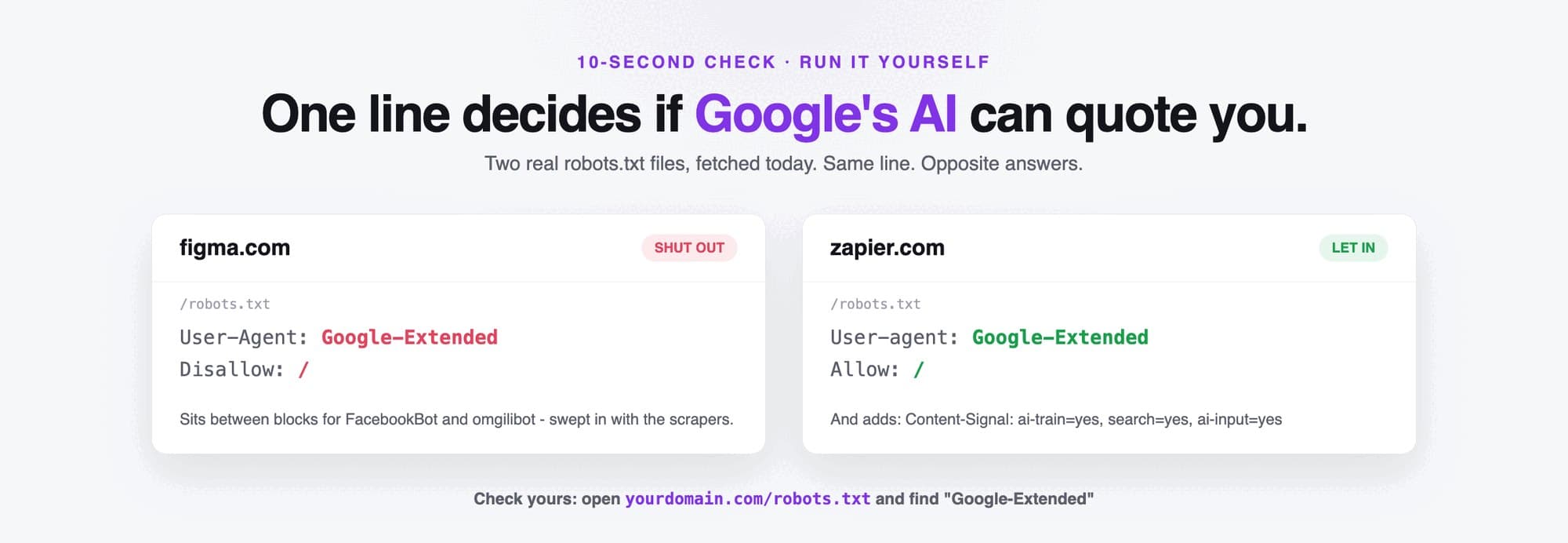
Figma's robots.txt disallows Google-Extended in a list of AI training and scraping bots: GPTBot, cohere-ai, ClaudeBot, CCBot, FacebookBot, omgilibot, Bytespider and others. It sets no rule for OAI-SearchBot, PerplexityBot or Claude-SearchBot, so those fall under its general rules. That reads as a coherent policy: no training, but still findable in AI search. The catch is that Google-Extended isn't only a training switch. It also covers Gemini grounding, so Figma's block reaches further than its GPTBot block does.
Zapier's robots.txt goes the other way. It explicitly allows GPTBot, OAI-SearchBot, ChatGPT-User, ClaudeBot, Claude-User, Claude-SearchBot, Google-Extended, PerplexityBot and DuckAssistBot, then adds a line from Cloudflare's Content Signals Policy: Content-Signal: ai-train=yes, search=yes, ai-input=yes. Cloudflare published the policy in September 2025 to let sites state separate preferences for search indexing, AI input such as grounding, and AI training. Crawlers aren't obliged to honour these signals, but they make your intent explicit.
Neither file is wrong. Both are decisions. The mistake is having a Google-Extended line you didn't decide on, copied from a template in 2023.
What blocking Google-Extended costs you
- Gemini's live answers. Google says the token controls grounding in Gemini Apps, so a block keeps your pages out of the web content Gemini pulls in at prompt time. In Outrank's study of AI citations across 200 sites, Gemini accounted for 11.9% of all citations and cited 106 of the 200 sites. In our test of 96 questions across four AI assistants, 74% of the sources Gemini cited were blog content.
- Future Gemini training. Your content is excluded from training future Gemini models. Whether that changes what Gemini "knows" about your brand hasn't been measured publicly.
- Not your Google rankings. Google states the token isn't used as a ranking signal in Search, and AI Overviews and AI Mode keep using your pages through Googlebot.
Every AI crawler token, compared
Google-Extended is one of a dozen tokens you can set. Each company splits training, search and user-triggered fetching differently, so check each line before you copy a blocklist.
AI crawler tokens and what a Disallow does (October 2026)
| Google-Extended | Training Gemini; grounding in the Gemini app and Vertex AI (no crawler of its own) | Out of Gemini training and grounding; Search, AI Overviews and AI Mode unaffected | |
| Googlebot | Google Search index, which also feeds AI Overviews and AI Mode | Out of Google Search entirely, AI features included | |
| GPTBot | OpenAI | Training OpenAI's foundation models | Out of training; ChatGPT search unaffected |
| OAI-SearchBot | OpenAI | Surfacing sites in ChatGPT search | Not shown in ChatGPT search answers (navigational links may remain) |
| ChatGPT-User | OpenAI | Fetching a page when a ChatGPT user asks | May not apply, because the visit is user-initiated |
| ClaudeBot | Anthropic | Collecting content for model training | Excluded from future training data |
| Claude-SearchBot | Anthropic | Indexing content for Claude's search results | Less visibility in Claude's search answers |
| Claude-User | Anthropic | Fetching a page when a Claude user asks | Claude can't retrieve your page for that user |
| PerplexityBot | Perplexity | Perplexity's search index (not used for training) | Not surfaced in Perplexity results |
| Perplexity-User | Perplexity | Fetching a page when a Perplexity user asks | Generally ignores robots.txt, as the fetch is user-requested |
| Applebot-Extended | Apple | Training Apple's foundation models (no crawler of its own) | Out of Apple model training; Siri and Spotlight search unaffected |
| CCBot | Common Crawl | Open web archive widely used to train AI models | Left out of future Common Crawl snapshots |
Click a column header to sort.
Sources: OpenAI, Anthropic, Perplexity, Apple and Google.
Should you block Google-Extended?
Allow it if you want AI assistants to recommend you. That covers most businesses that sell a product or service. Blocking it costs you Gemini's grounded answers and gains you little, since Googlebot still crawls everything and AI Overviews still use your pages.
Block it if your content is the product. Publishers, paid research and premium courses have good reasons to keep their work out of model training, and the trade-off of fewer Gemini citations may be worth it. Figma's split (block training tokens, leave search bots alone) is a sensible template, with the caveat that Google-Extended also covers Gemini grounding.
Either way, write the decision down, apply it to every AI token in the table above, and recheck it when a new bot appears. And make sure blocking isn't happening one layer up: Cloudflare changed its default to block AI crawlers in July 2025, so check your CDN settings as well as robots.txt (more on access and server speed in does page speed affect AI SEO).
Letting AI in is only step one. It still needs something worth quoting: pages that answer your buyers' real questions in plain text (see how AI reads your website). That's what Outrank writes and publishes to your CMS every day, and how to get ChatGPT to recommend your product covers the rest of the playbook. To check whether AI already cites you, Bing's free AI Performance report shows the queries behind Copilot's citations, and is your website ready for AI agents covers the technical checks beyond robots.txt.
FAQ
What is Google-Extended?
Google-Extended is a product token you can use in robots.txt to control whether Google may use your crawled content to train future Gemini models and to ground answers in the Gemini app and Vertex AI. It has no crawler of its own: Googlebot does the fetching and the token sets the usage rule.
Does blocking Google-Extended affect SEO?
No. Google's documentation says Google-Extended doesn't affect a site's inclusion in Google Search and isn't used as a ranking signal. Your pages keep being crawled by Googlebot and can still appear in regular results, AI Overviews and AI Mode.
Does Google-Extended block AI Overviews?
No. AI Overviews and AI Mode are part of Google Search and use content crawled by Googlebot. To limit how your content appears in them you'd need nosnippet, data-nosnippet, max-snippet or noindex, which also affect your normal search listings.
What is the Google-Extended user agent?
There isn't one. Google says Google-Extended doesn't have a separate HTTP user agent string, so it never appears in your server logs. You can only see your setting by reading your robots.txt.
How do I block Google-Extended?
Add two lines to the robots.txt file at the root of your domain: User-agent: Google-Extended followed by Disallow: /. To block only part of the site, replace the slash with a folder path such as /research/.